
How to Run Reports and What Each Report Shows
What This Is
The Reports section allows you to generate, review, and export important business data from your BRS account.
Reports help you understand:
- Revenue performance
- Customer activity
- Product performance
- Order trends
- Payment methods
- Taxes collected
- Tips received
All reports can be exported for further analysis, accounting, bookkeeping, or record-keeping purposes.
How to Access Reports
-
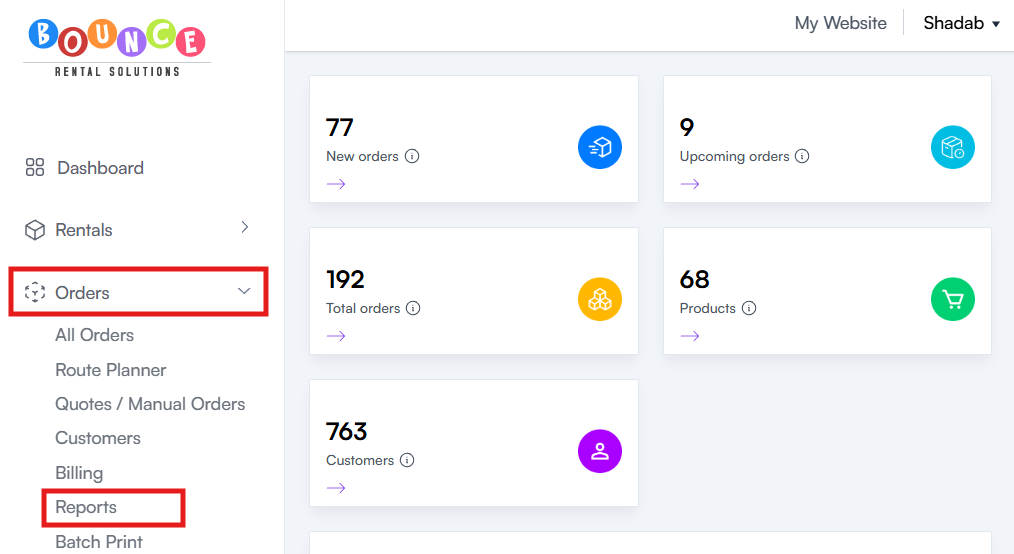
Go to Orders → Reports
-
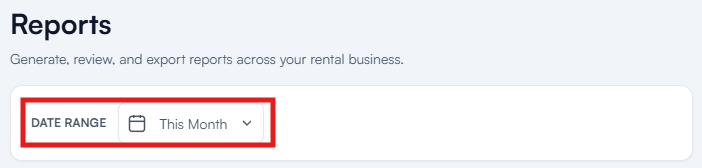
Select the desired Date Range
-
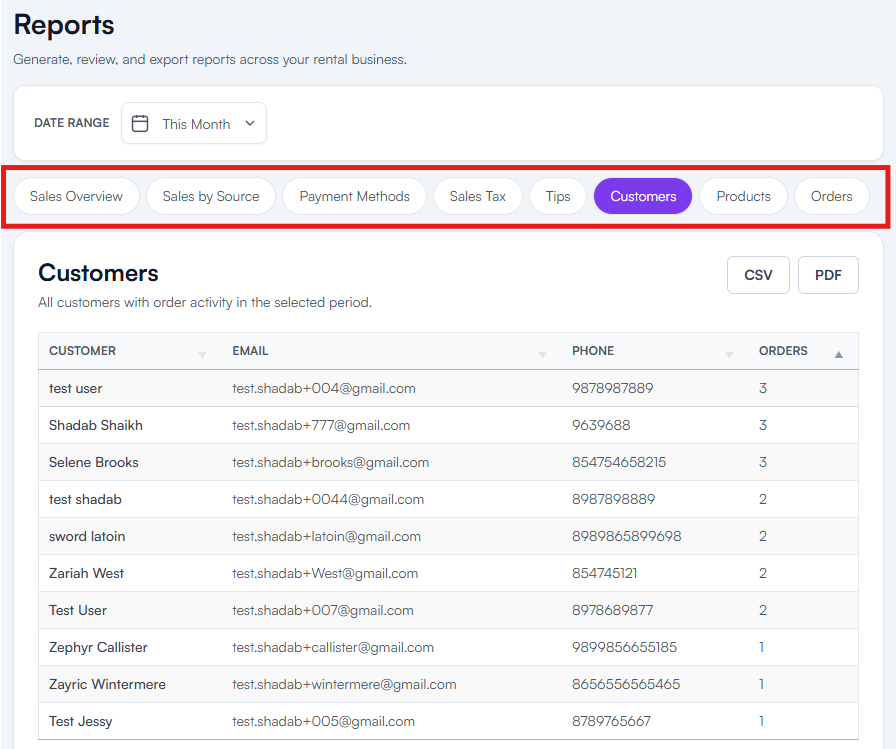
Choose the report you want to view
-
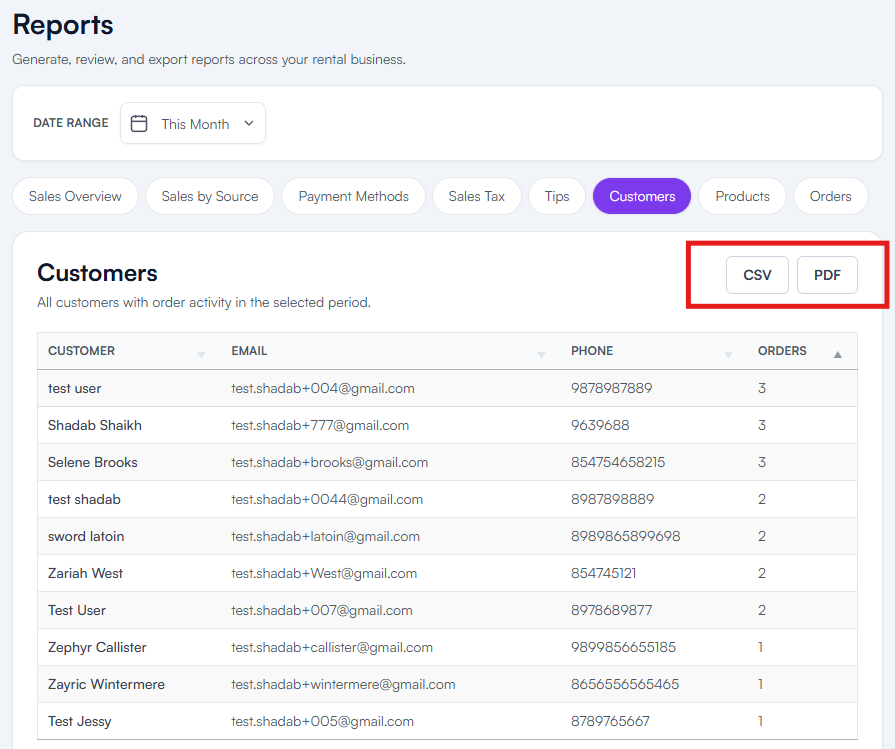
To Download it, Click CSV or PDF
Available Reports
Sales Overview
The Sales Overview report provides a comprehensive summary of your business performance during the selected period.
This report includes:
- Total revenue
- Discounts
- Fees
- Adjustments
- Order totals
- Year-over-year comparisons
Use this report when you want a high-level view of how your business is performing.
Sales by Source
The Sales by Source report shows where your orders originated.
Sources may include:
- Website Orders
- Manual Orders
- Quotes
This report helps answer questions such as:
- How many bookings came from the website?
- How many orders were manually created?
- How many quotes converted into sales?
Understanding your order sources can help you identify which sales channels are performing best.
Payment Methods
The Payment Methods report shows how customers paid for their orders.
This report includes:
- Total transactions by payment type
- Amount collected
- Refund totals
- Net payments received
Common payment methods may include:
- Credit Card
- Cash
- Check
- Other configured payment types
This report is especially useful for bookkeeping and payment reconciliation.
Sales Tax
The Sales Tax report shows the total sales tax collected during the selected period.
This report helps businesses:
- Prepare tax filings
- Verify collected tax amounts
- Review tax liability
If your business collects sales tax, this report can simplify tax reporting and accounting processes.
Tips
The Tips report displays all gratuities collected from customers during the selected period.
This report includes:
- Total tips received
- Tip amounts associated with orders
Businesses often use this report to track employee gratuities or evaluate customer tipping trends.
Customers
The Customers report displays all customers who had order activity during the selected date range.
Information may include:
- Customer names
- Contact information
- Order activity
This report is useful for:
- Marketing campaigns
- Customer retention efforts
- Reviewing customer history
Products
The Products report provides insight into inventory performance.
This report may include:
- Units rented
- Revenue generated per product
- Product utilization
Use this report to identify:
- Best-selling inventory
- Underperforming products
- High-revenue items
- Seasonal trends
Many businesses use this report when making purchasing and inventory decisions.
Orders
The Orders report displays all orders within the selected date range.
This report includes:
- Order numbers
- Customer information
- Booking totals
- Order statuses
You can click on any order within the report to open its full detail view.
This report is commonly used for operational reviews and auditing order activity.
Exporting Reports
All reports can be exported in the following formats:
CSV
CSV files can be opened in:
- Microsoft Excel
- Google Sheets
- Apple Numbers
- Other spreadsheet applications
CSV exports are ideal for:
- Data analysis
- Custom reporting
- Bookkeeping
- Accounting
PDF exports are ideal for:
- Printing
- Sharing reports
- Record keeping
- Management reviews
Why Reports Matter
Regularly reviewing reports helps you:
- Monitor business performance
- Identify sales trends
- Track inventory utilization
- Understand customer behavior
- Improve marketing efforts
- Make informed business decisions
Many rental businesses only review revenue, but some of the most valuable insights often come from customer, product, and source reports.
Best Practices
Consider reviewing:
Weekly
- Sales Overview
- Orders
- Products
Monthly
- Payment Methods
- Sales Tax
- Customers
Quarterly
- Year-over-year comparisons
- Product performance
- Sales by Source
Consistent reporting helps identify opportunities and problems before they become larger operational issues.
Important Notes
Reports only display information within the selected date range.
If data appears to be missing:
- Verify the selected date range
- Regenerate the report
- Confirm the order activity occurred during that period
The accuracy of your reports depends on the accuracy of the data entered into your orders and products.
Additional Recommendations
Before making major pricing, marketing, or inventory decisions, review multiple reports together rather than relying on a single metric.
For example, a product may generate high revenue but have low utilization, while another product may generate lower revenue but be booked consistently. Looking at multiple reports provides a more complete picture of your business performance.