
Understanding Delivery Time Increment Settings
What This Is
The Delivery Time Increment setting controls how delivery and pickup time options appear on your website during checkout.
This setting helps keep scheduling realistic and aligned with your actual delivery workflow.
Instead of allowing customers to choose any random time, BRS limits selections to structured intervals.
Example:
30-minute increments:
- 9:00
- 9:30
- 10:00
-
10:30
How to Access Delivery Time Increment Settings
-
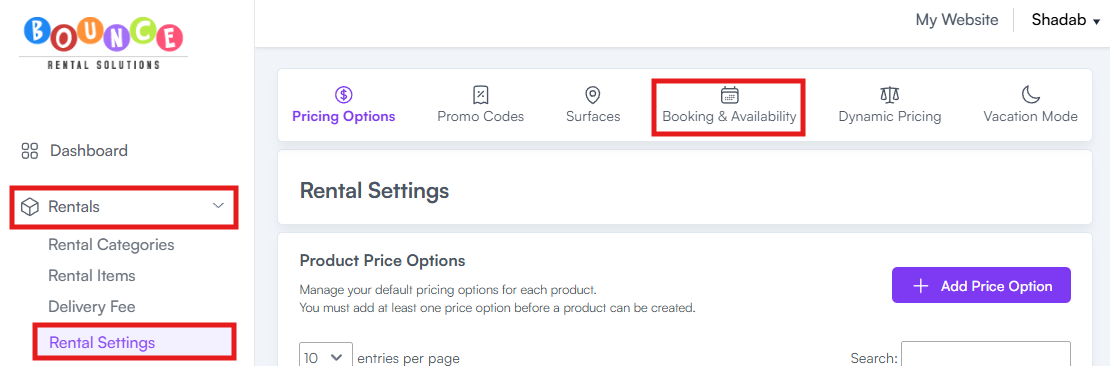
Go to Rentals → Rental Settings → Booking & Availability
-
Locate the Delivery Time Increments setting
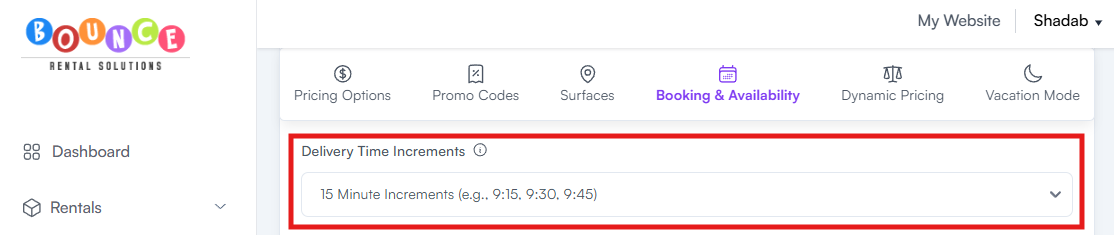
- Select the increment option you want to use
- Save your changes
Your selected increment will control how delivery and pickup time options appear to customers during checkout.
Available Increment Options
Delivery time increments cannot be customized down to exact minutes.
BRS currently supports:
- 15-minute increments
- 30-minute increments
- 60-minute increments
Example:
15-minute increments:
- 9:00
- 9:15
- 9:30
- 9:45
30-minute increments:
- 9:00
- 9:30
- 10:00
60-minute increments:
- 9:00
- 10:00
- 11:00
Why This Setting Matters
Without controlled scheduling increments, customers may select unrealistic or overly specific delivery times that are difficult to manage operationally.
Structured increments help:
- Keep routes organized
- Simplify scheduling
- Reduce dispatch confusion
- Improve delivery planning
- Prevent impossible timing overlaps
The smaller the increment, the more precise the customer scheduling options become.
Our Recommendation
In most cases, we recommend using 60-minute increments.
Why:
- Shorter increments create significantly more time options
- More options force customers to scroll longer during checkout
- Mobile users especially may experience a more frustrating booking process
- Too many time choices can increase checkout abandonment
Most rental businesses do not actually benefit operationally from extremely granular delivery selections.
Cleaner scheduling usually creates:
- Faster checkout experiences
- Less customer confusion
- Better mobile usability
- More manageable routing expectations
Many businesses mistakenly assume more precise-looking scheduling automatically creates a more professional experience. In reality, it often creates more operational stress and customer frustration.
Common Increment Recommendations
15-Minute Increments
Best for:
- Highly structured operations
- Dedicated dispatch teams
- Very tight urban delivery routing
- Businesses with large fleets
This option creates the most customer choices but also the most scheduling complexity.
30-Minute Increments
Best for:
- Medium-sized operations
- Moderate delivery coordination
- Businesses wanting tighter scheduling without excessive granularity
This is often a middle-ground option.
60-Minute Increments
Best for:
- Most rental companies
- Smaller operations
- Flexible routing schedules
- Businesses with variable setup times
- Companies prioritizing a cleaner checkout experience
This is typically the most operationally realistic option.
How Delivery Increments Affect Customers
Customers will only see delivery and pickup times that match your configured interval settings.
This means:
- Cleaner booking experience
- More controlled scheduling
- Less random timing requests
However, smaller increments do not automatically guarantee operational precision.
A customer selecting 9:00 AM does not magically remove traffic, delays, weather, setup complexity, or route issues.
Many rental companies make the mistake of offering extremely precise delivery times they cannot realistically maintain consistently.
Best Practices
Choose increments based on your actual operations, not ideal scenarios.
Use Smaller Increments If:
- You have multiple trucks
- Tight routing systems exist
- Drivers use scheduled dispatching
- Delivery timing is highly controlled
Use Larger Increments If:
- Routes vary heavily
- Traffic delays are common
- Setup times fluctuate significantly
- Your operation is still small or growing
Operational reality matters more than making the calendar look precise.
Important Notes
This setting only controls how time options are displayed to customers.
It does not:
- Automatically optimize routes
- Prevent scheduling conflicts
- Guarantee arrival times
- Replace dispatch management
Businesses still need proper operational coordination behind the scenes.
Additional Recommendations
Avoid setting delivery increments unrealistically small just to appear more professional.
Overpromising precision usually creates:
- Customer frustration
- Late deliveries
- Driver stress
- Operational bottlenecks
The best scheduling systems are realistic, manageable, and sustainable under actual busy-season conditions.