
Understanding Parent and Child Product Types
What This Is
The Parent and Child Product Type setting is used for inventory that can be rented either as one complete unit or as multiple separate pieces.
This is commonly used for inflatables or equipment that can be detached and rented individually.
Example
A dual-lane water slide consists of two separate slides that can be connected together.
In this setup:
- The complete dual slide is the Parent Product
- Each individual slide is a Child Product
This allows customers to rent:
- The complete dual slide
- Either slide individually
Inventory is automatically managed between the Parent and Child products to prevent double-booking.
Understanding Parent vs. Child Products
Child Product
A Child Product is an individual piece that can be rented on its own.
Examples:
- Left slide of a dual slide
- Right slide of a dual slide
- Individual inflatable module
- Separate obstacle course section
Parent Product
A Parent Product is the complete assembled unit made up of multiple Child Products.
Examples:
- Complete dual slide
- Full obstacle course
- Combined inflatable attraction
The Parent Product pulls inventory from its associated Child Products.
How to Create a Child Product
Always create the Child Products first before creating the Parent Product.
-
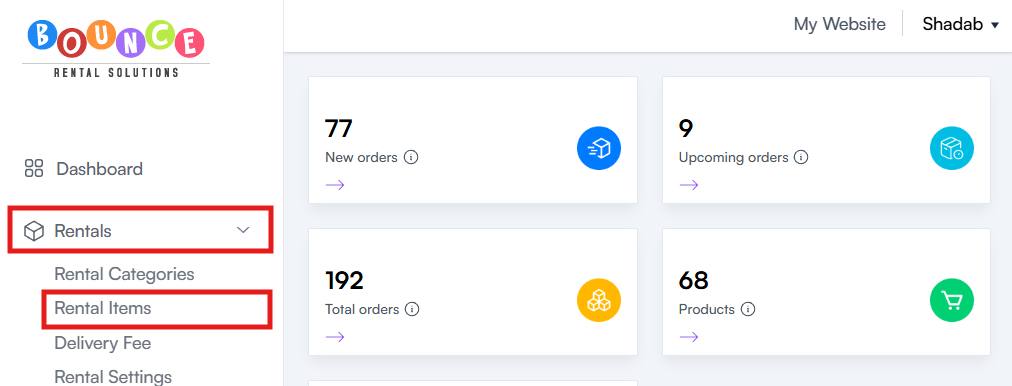
Go to Rentals → Rental Items
-
Create or Edit the Product
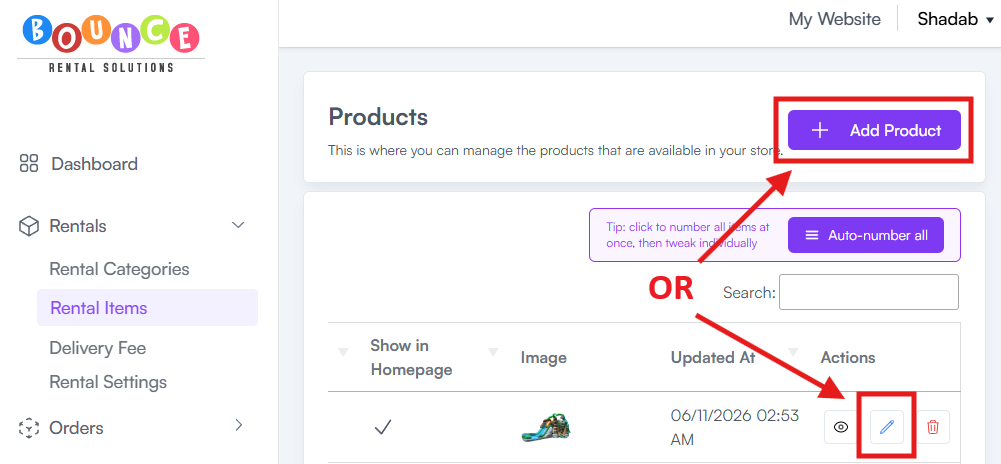
- Click Add Product if the item does not exist
- Click Edit (Pencil Icon) if the item already exists
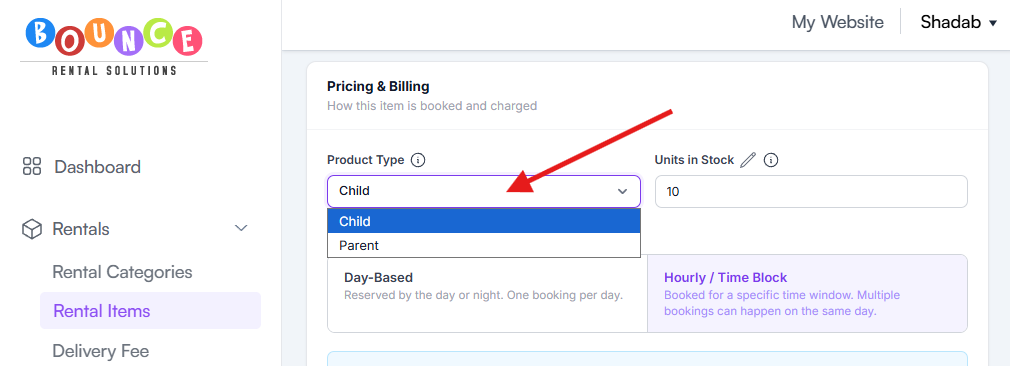
- Navigate to the Pricing/Billing section
- Locate the Product Type dropdown
-
Select Child
- Save the Product
- If creating a new product, complete the remaining product information and click Create Product
- If editing an existing product, click Update Product
Repeat this process for each individual piece that can be rented separately.
Once all individual pieces are configured as Child Products, you can create the Parent Product.
How to Create a Parent Product
-
Go to Rentals → Rental Items
-
Create or Edit the Product
- Click Add Product if the Parent Product does not exist
- Click Edit (Pencil Icon) if the Parent Product already exists
- Navigate to the Pricing/Billing section
- Locate the Product Type dropdown
-
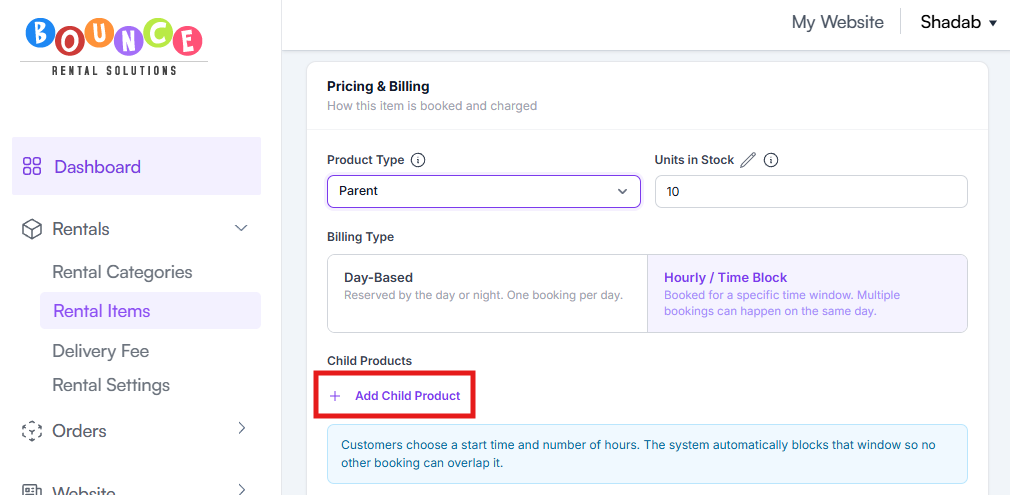
Select Parent
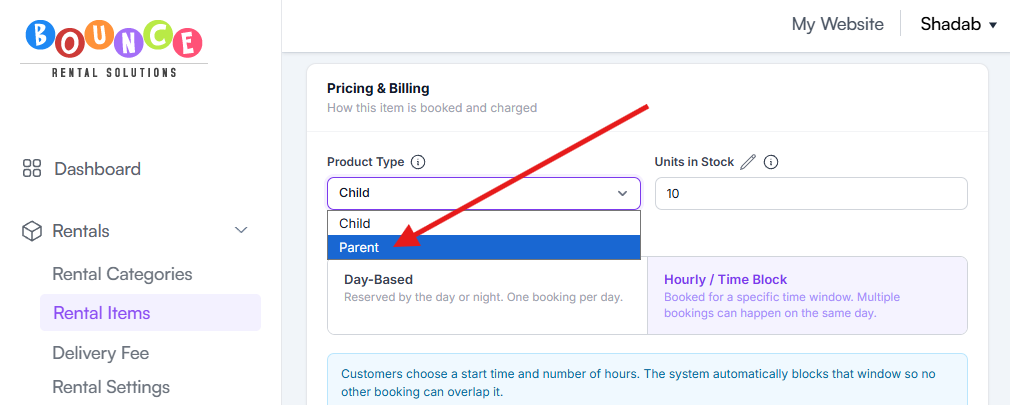
- After selecting Parent, an additional option will appear below the Billing Type section.
-
Click Add Child Product
-
Select a Child Product from the dropdown list
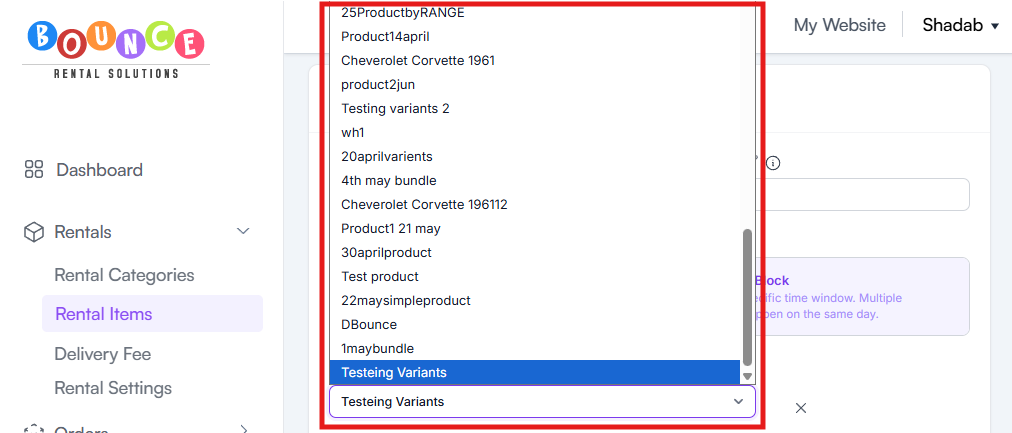
- Repeat until all pieces that make up the complete unit have been added
Make sure every component of the combined item is added as a Child Product.
- Save the Product
- If creating a new product, complete the remaining product information and click Create Product
- If editing an existing product, click Update Product
Example Setup
Child Products
- Tropical Slide Left Lane
- Tropical Slide Right Lane
Both products are configured as Child Products.
Parent Product
- Tropical Dual Lane Water Slide
Configured as a Parent Product and linked to both Child Products.
Customers can now rent:
- Either lane individually
- The complete dual-lane slide
Inventory will stay synchronized automatically.
Why Use Parent and Child Products?
This setup helps businesses:
- Prevent double-bookings
- Manage inventory accurately
- Offer flexible rental options
- Sell individual sections separately
- Sell combined units as a premium option
Without Parent and Child relationships, inventory can become difficult to track when products share the same physical components.
Important Notes
- Create Child Products First
- Parent Products cannot be properly configured until the Child Products already exist.
- Always create and save the Child Products before creating the Parent.
- Inventory Is Shared
- Parent and Child Products share inventory availability.
- When a Child Product is booked, it may affect the availability of the Parent Product and vice versa.
- Not Needed for Standard Inventory
- Most products do not require Parent and Child setup.
Only use this feature when:
- Products share physical components
- Inventory can be rented individually or combined
- Availability needs to stay synchronized
Best Practices
Use Parent and Child Products for:
- Dual-lane slides
- Modular obstacle courses
- Multi-piece inflatables
- Equipment bundles that can be rented separately
Avoid using Parent and Child Products when inventory items are completely independent of each other.
Additional Recommendations
Before making Parent Products available for booking, test several rental scenarios to ensure availability behaves as expected.
Proper Parent and Child setup helps eliminate inventory conflicts and gives customers more flexibility when selecting rental options.