
Additional Surface Fees
What This Is
Additional Surface Fees allow you to charge extra fees for specific products when they are set up on certain surfaces.
These fees are charged per item × quantity and are added on top of any global surface fee configured in your Rental Settings.
This is useful when certain products require additional labor, anchoring, equipment, or setup time depending on the surface where they will be installed.
How Surface Fees Work
Surface pricing consists of two separate charges:
Global Surface Fee
The Global Surface Fee is charged once per order whenever a customer selects a specific surface during checkout.
This fee is configured under:
Rentals → Rental Settings → Surfaces
Additional Surface Fee
The Additional Surface Fee is charged for each unit of a specific product.
If a customer rents multiple quantities of that product, the fee is applied to each unit.
Example
Assume the following configuration:
| Surface | Global Fee | Additional Product Fee |
| Grass | $10 | $5 |
| Dirt | $25 | $10 |
Customer Order:
- 3 Bounce Houses
- Setup Surface: Dirt
Charges:
- Global Dirt Fee: $25 (charged once)
- Additional Product Fee: $10 × 3 units = $30
Total Surface Charges:
$25 + $30 = $55
Common Uses
Many rental companies use Additional Surface Fees for:
- Large inflatables
- Water slides
- Obstacle courses
- Tents
- Equipment requiring special anchoring
- Products that require extra setup labor
For example, installing a large inflatable on dirt may require additional stakes, labor, or equipment compared to installation on grass.
How to Access Additional Surface Fees
-
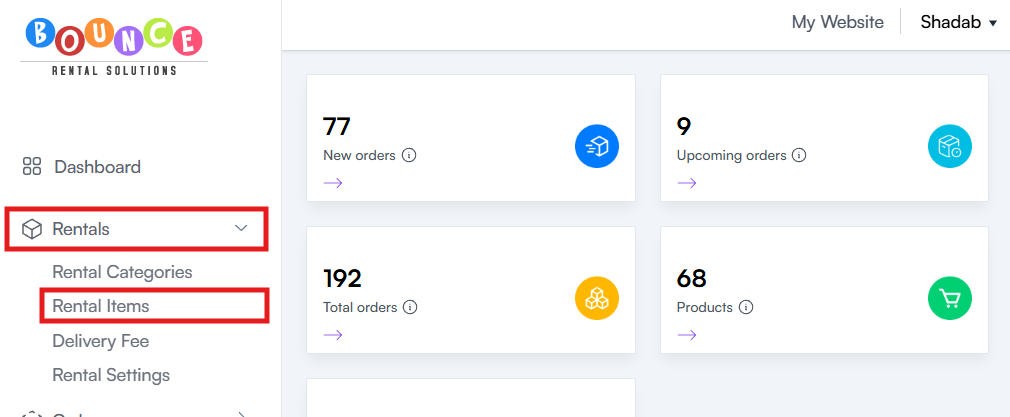
Go to Rentals → Rental Items
-
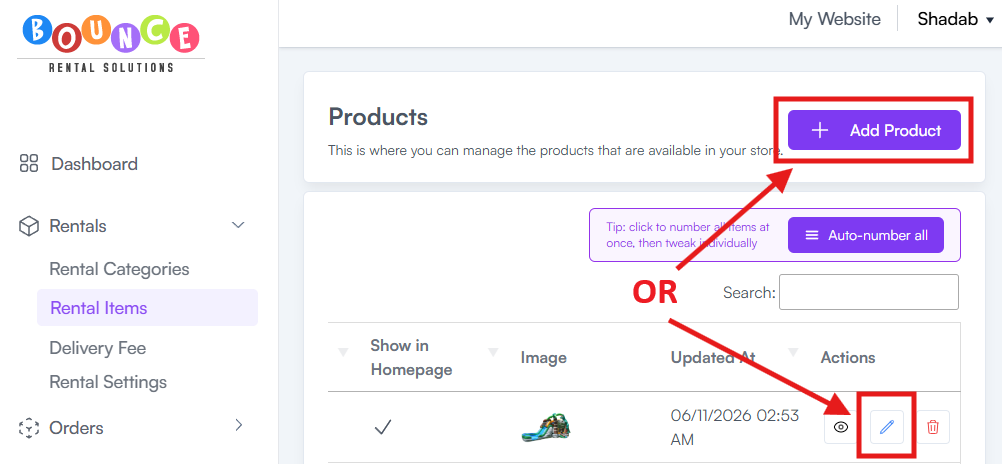
Create a new product or edit an existing product
-
Scroll all the way down and locate the Additional Surface Fees section
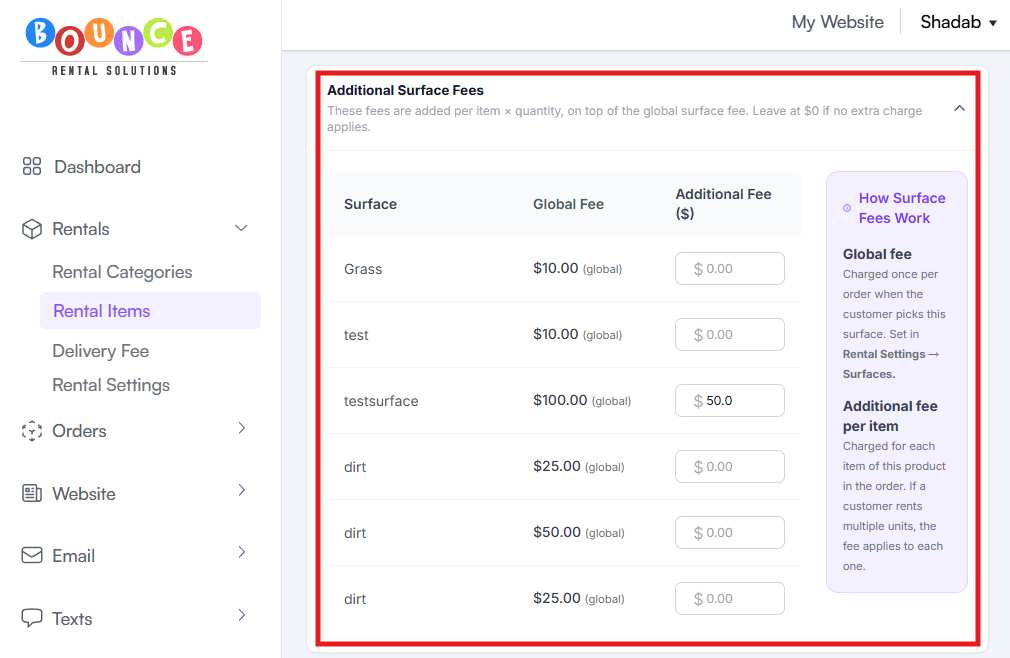
You will see a list of your configured surfaces along with their associated Global Fees.
Configuring Additional Surface Fees
For each surface:
- Locate the surface you want to modify
- Enter the additional fee amount
- Save or update the product
If no additional charge applies, leave the fee at: $0.00
Example Surface Table
| Surface | Global Fee | Additional Fee |
| Grass | $10.00 | $0.00 |
| Dirt | $25.00 | $10.00 |
| Concrete | $15.00 | $5.00 |
In this example:
- Grass only charges the global fee
- Dirt charges the global fee plus an additional $10 per product unit
- Concrete charges the global fee plus an additional $5 per product unit
Why Use Additional Surface Fees?
Additional Surface Fees help recover costs associated with:
- Extra labor
- Additional setup time
- Specialized installation requirements
- Additional anchoring equipment
- Difficult installation environments
Instead of charging the same amount regardless of setup conditions, you can adjust pricing based on the actual work required.
Important Notes
Global Fees and Additional Fees Stack
Additional Surface Fees do not replace Global Surface Fees.
Both charges can apply to the same order.
Fees Apply Per Unit
Additional Surface Fees are charged per item quantity.
Example:
- Additional Fee: $10
- Quantity Ordered: 4
Additional Surface Charge:
$10 × 4 = $40
Leave Unused Surfaces at $0
If a surface does not require additional charges, leave the value set to $0.00.
No additional fee will be added.
Best Practices
Consider applying Additional Surface Fees when:
- Setup requires significantly more labor
- Installation requires specialized equipment
- Certain surfaces increase operational costs
- Larger products require additional anchoring
Avoid adding fees unless there is a legitimate operational reason for the charge.
Customers are generally more accepting of fees when they reflect actual setup requirements.
Additional Recommendations
Review your surface fees periodically as labor costs, installation requirements, and operating expenses change.
Well-configured surface fees help ensure that difficult installations remain profitable while keeping pricing fair and transparent for customers.