
Tracking Bookings and Revenue in Google Analytics & Google Ads
What This Is
This feature allows BRS to send completed booking and revenue data directly to your Google Analytics and Google Ads accounts.
This helps you understand:
- Which marketing campaigns are generating bookings
- Which ads are producing revenue
- How much revenue your website generates from paid advertising
- Your return on ad spend (ROAS)
Unlike many tracking systems that only record deposits, BRS sends the full order value when a booking is completed. This provides more accurate revenue reporting and helps you better measure the effectiveness of your advertising campaigns.
Why This Matters
Without conversion tracking, it can be difficult to know whether your advertising is actually generating revenue.
For example:
You may spend:
$500 on Google Ads
And receive:
10 bookings worth $3,500
Without proper tracking, Google may only see website visits and clicks. It cannot accurately determine how much revenue those bookings generated.
By connecting your Google Analytics and Google Ads accounts, you can track:
- Completed bookings
- Revenue generated
- Conversion performance
- Return on ad spend (ROAS)
This allows you to make better advertising decisions and focus your budget on campaigns that produce results.
Where to Find It
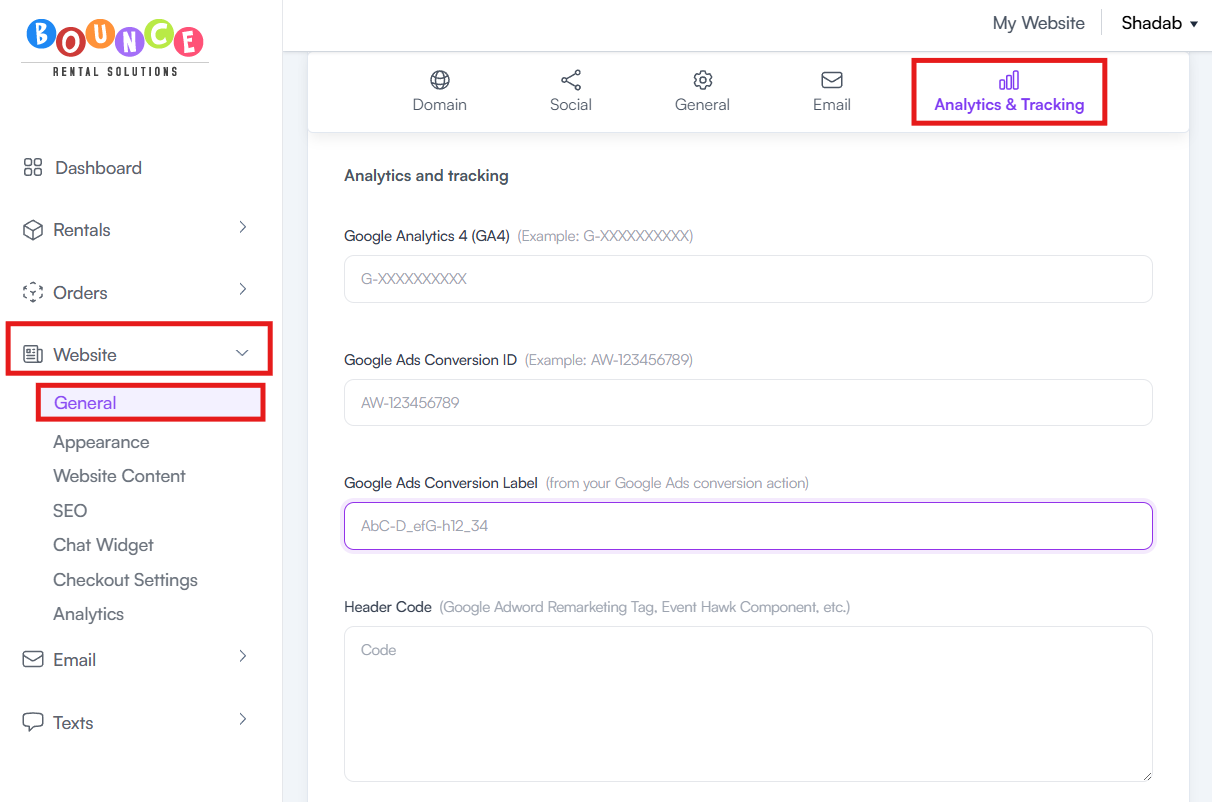
Go to Website → General → Analytics & Tracking
Information You'll Need
To enable tracking, you can enter the following information:
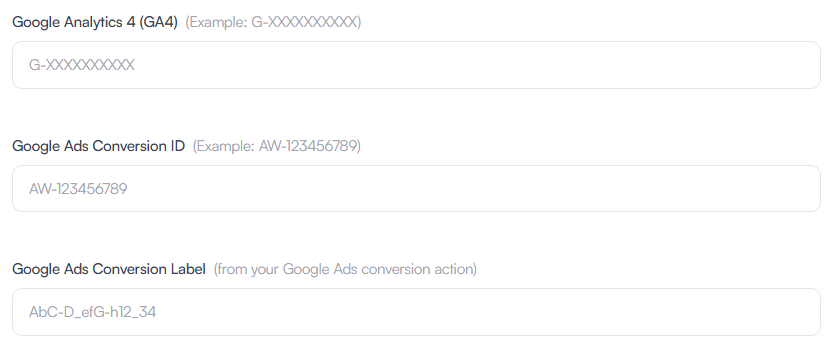
Google Analytics 4 (GA4) ID
This connects completed booking data to your Google Analytics account.
Google Analytics can help you understand:
- Website traffic
- User behavior
- Conversion activity
- Revenue attribution
Google Ads Conversion ID
This allows Google Ads to identify which advertising account should receive conversion data.
Google Ads Conversion Label
The Conversion Label identifies the specific conversion action inside your Google Ads account that should receive booking data.
How to Configure
-
Go to Website → General → Analytics & Tracking
- Enter your Google Analytics ID
- Enter your Google Ads Conversion ID
-
Enter your Google Ads Conversion Label
-
Submit your changes
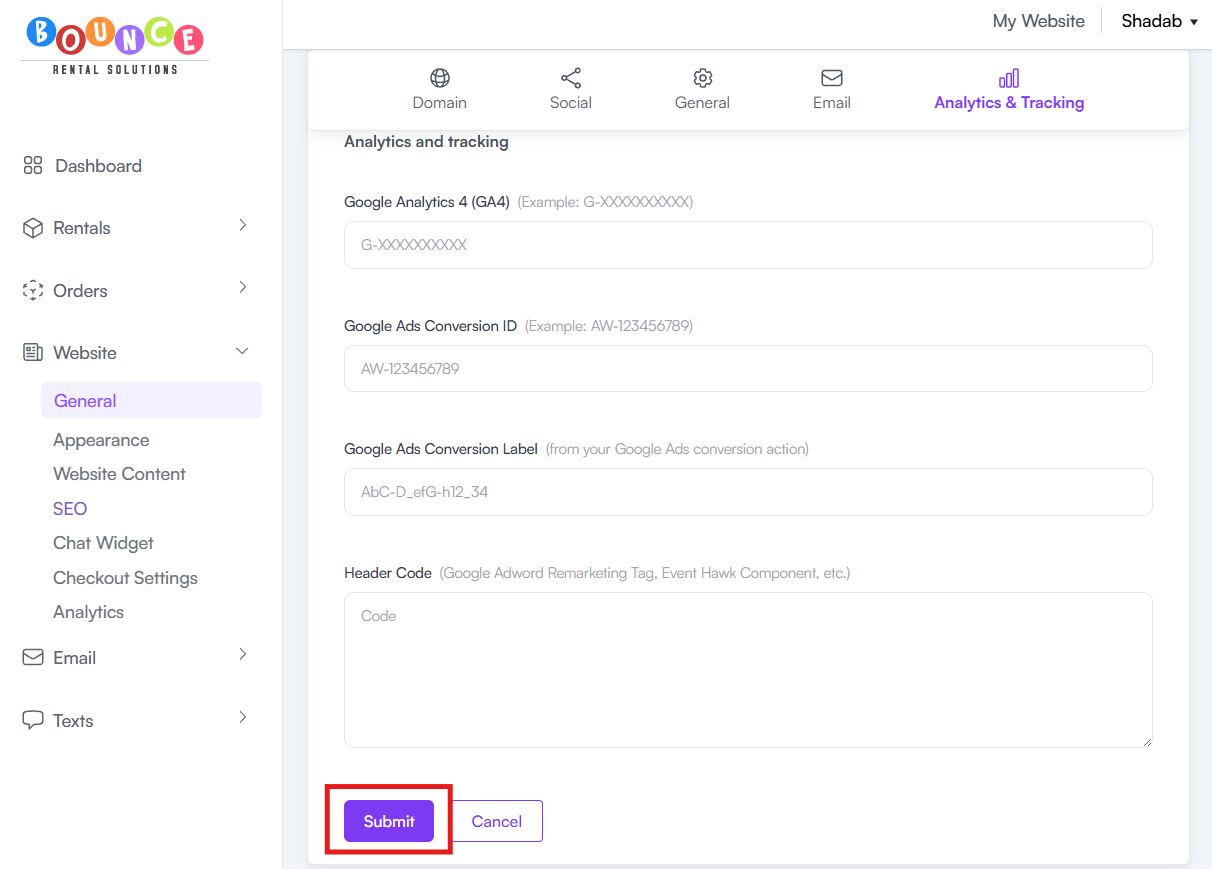
Once configured, BRS can begin sending completed booking information to Google when customers place orders through your website.
What Gets Tracked
When a customer completes a booking through your website, BRS can send:
- Completed order information
- Conversion data
- Revenue data
- Order value
This helps Google understand the actual value generated by your marketing efforts.
Understanding ROAS (Return on Ad Spend)
ROAS measures how much revenue is generated for every dollar spent on advertising.
Example:
Advertising Spend:
$500
Revenue Generated:
$2,500
ROAS:
5x Return on Ad Spend
This means every $1 spent on advertising generated $5 in revenue.
Accurate revenue tracking allows you to identify which campaigns are profitable and which campaigns need improvement.
Important Notes
Full Order Totals Are Used
BRS sends the completed booking value rather than only the deposit amount.
This provides more accurate revenue reporting inside Google Ads and Google Analytics.
For rental businesses that collect deposits at checkout, this can significantly improve the accuracy of ROAS calculations.
Tracking Only Applies to Website Bookings
Designed to track bookings that are completed through your website.
Manual orders entered by staff may not appear the same way in Google Analytics or Google Ads because they were not generated through a website visitor session.
Google Account Setup Is Required
You must already have:
- A Google Analytics account
- A Google Ads account (if using Google Ads tracking)
- An existing conversion action configured within Google Ads
BRS does not create these accounts or conversion actions automatically.
Who Should Use This Feature
This feature is especially valuable for businesses that:
- Run Google Ads
- Invest in online marketing
- Track advertising performance
- Want accurate revenue attribution
- Monitor return on ad spend
If you are spending money to generate website traffic, conversion tracking is one of the most important tools available for measuring success.
Additional Recommendations
If you run Google Ads, configure this as early as possible.
The sooner conversion tracking is enabled, the sooner Google can begin collecting data about which campaigns, keywords, and ads are generating actual revenue for your business. This data can be invaluable when deciding where to invest your advertising budget.