
How to Add Social Links to Your Website
What This Is
Social links connect the social media icons on your website to your business's actual social profiles. They appear in your site footer and let customers follow you on the platforms they use most — which keeps your business top-of-mind for repeat bookings and referrals.
Steps
- Go to Website → General → Social
-
Enter the full URL for each social profile you have (for example, https://www.facebook.com/yourbusiness)
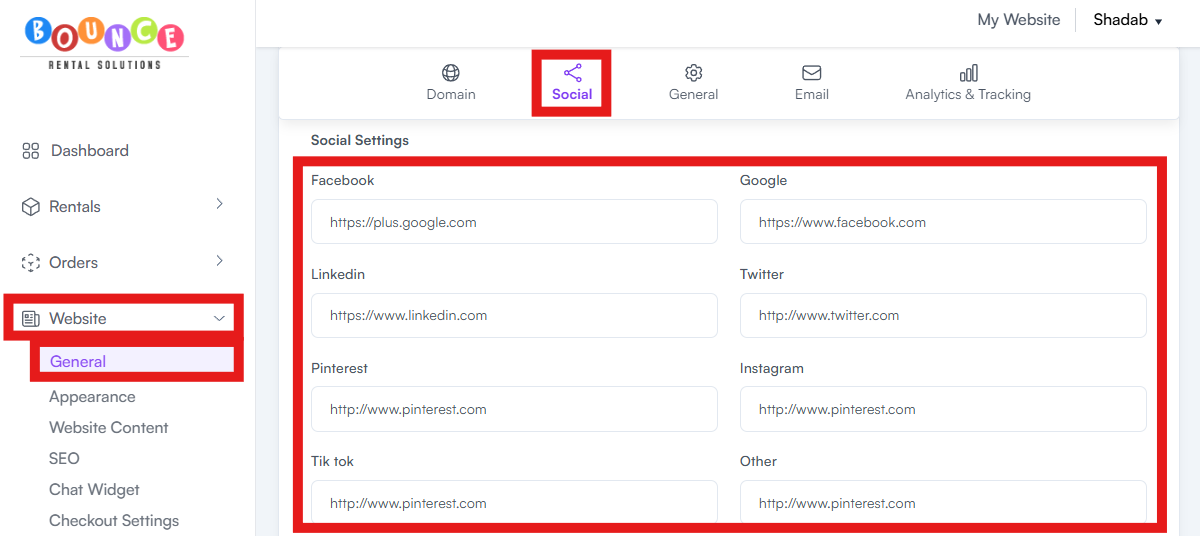
- Leave blank any social platforms you do not actively use
- Save/Submit your settings
Supported Platforms
BRS supports links to the following platforms:
- TikTok
- YouTube
- X (formerly Twitter)
If you need to add a platform that isn't shown, contact BRS support.
Important — Use Full URLs
Always enter the full URL including https://, not just your username.
✅ Correct: https://www.instagram.com/yourbusiness

❌ Incorrect: @yourbusiness or instagram.com/yourbusiness

Note: Do not link to inactive or empty social profiles. A neglected profile with five followers and a post from two years ago looks worse than no social link at all. Only link the platforms you actually maintain.