
How to Verify Your Domain for Newsletter & System Emails
What This Is
Domain verification allows BRS to send newsletters and system emails using your own business domain instead of a generic sending address.
This is what helps emails:
- Reach customer inboxes
- Avoid spam folders
- Pass modern email security checks
- Look legitimate to Gmail, Yahoo, Outlook, and other providers
Without proper verification, newsletter campaigns may fail to send or may land in spam much more frequently.
This article is specifically about outbound email authentication — proving that BRS is allowed to send emails on behalf of your business domain.
Steps
- Go to Website → General → Email
-
Find the Send emails from your own domain section
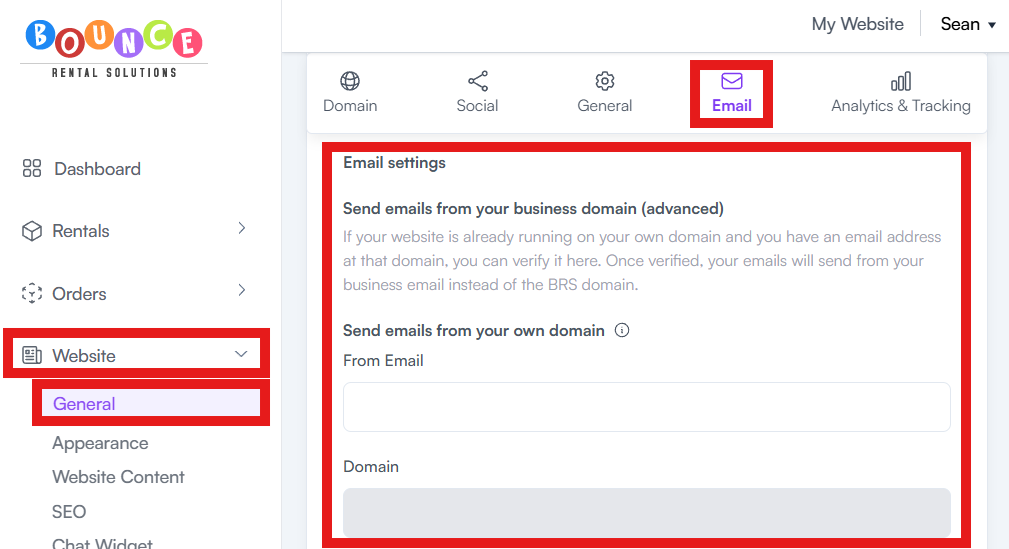
- Enter your business email address in the From Email field
Example:
- hello@yourcompany.com
- bookings@yourcompany.com
- support@yourcompany.com
- Save the changes
After saving:
- BRS automatically begins the domain verification process
- Required DNS records are provided and WILL need to be added to your domain provider
How Verification Works
When you add a From Email using your own domain:
- BRS checks whether your domain has the required authentication records
- These records prove BRS has permission to send emails for your domain
Verification will require DNS changes at your domain registrar.
Common providers include:
- GoDaddy
- Cloudflare
- Namecheap
- Google Domains
- Squarespace
What Successful Verification Looks Like
Your setup is only considered complete when BOTH of these appear:
- Green “Domain verified!” confirmation
- Newsletter Sending Status showing successful/active status
Both are required.
Why This Matters
Modern email providers aggressively filter unauthenticated email.
If your domain is not verified properly:
- Emails are more likely to go to spam
- Promotional campaigns may be blocked
- Customer trust decreases
- Delivery rates drop significantly
Proper domain authentication improves:
- Inbox placement
- Sender reputation
- Email deliverability
- Newsletter reliability
This also directly affects automated system emails such as:
- Booking confirmations
- Payment receipts
- Reminder emails
If customers report missing confirmations, spam filtering is one of the first things to investigate. See also: Confirmation Emails Going to Customer Spam.
Important Notes
Domain verification only controls outbound email authentication.
It does NOT:
- Create an inbox
- Receive incoming emails
- Forward emails to Gmail
- Replace Google Workspace or Microsoft 365