
How to Connect Square
What This Is
Square is a fully supported payment processor on BRS. It is a strong option for businesses already using Square for in-person transactions or those who prefer managing online and offline payments in one system.
Customers complete checkout directly on your website without being redirected elsewhere.
Before You Start
Before connecting Square:
- Your website domain must already be live
- SSL must already be active on your site
- You need an active Square account
- You should have access to log into Square during setup
You no longer need to manually copy and paste Square production tokens into BRS. The connection process is now handled automatically through Square authorization.
If you do not already have a Square account, create one first at Square
Important Requirement: SSL Must Be Active
Square’s payment fields will not appear unless SSL is active on your domain.
Do not attempt to troubleshoot missing card fields until:
- Your domain is fully connected
- SSL has finished installing
- Your website loads securely using HTTPS
This is the most common issue with Square setups.
How to Connect Square
-
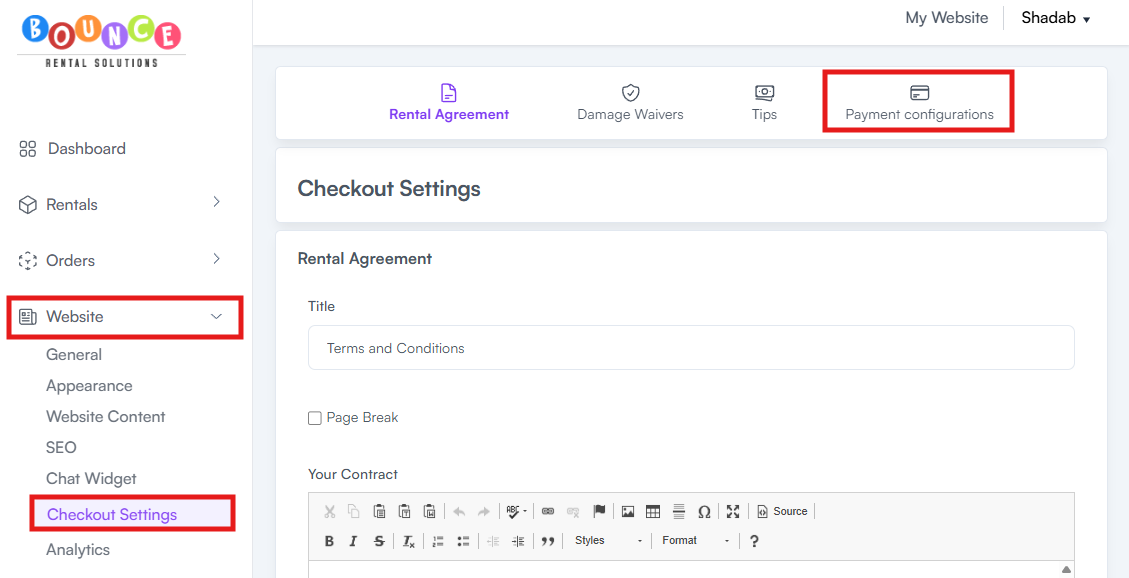
In your BRS dashboard, go to Website → Checkout Settings → Payment Configurations
-
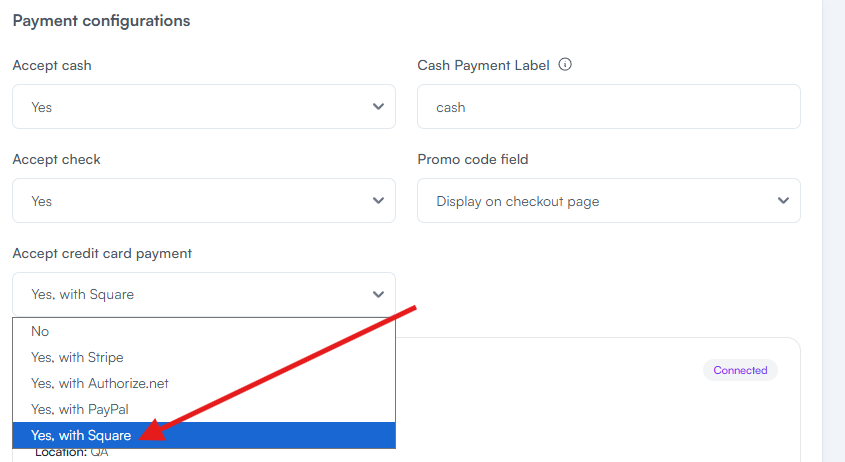
Select Square as your payment processor
-
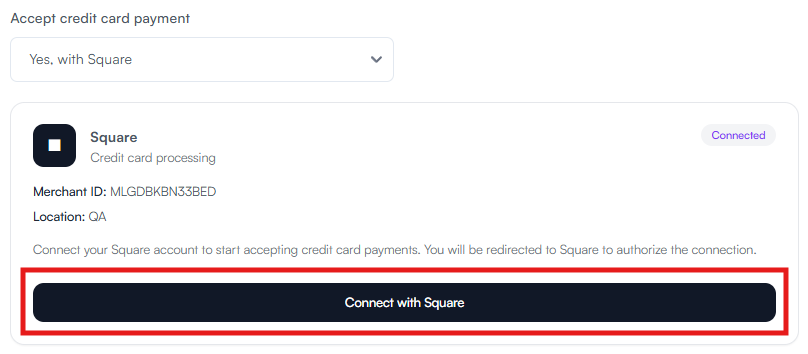
Click Connect with Square
- Log into your Square account if prompted
- Follow the authorization process inside Square
- Return to BRS once the connection is complete
-
Click Save Payment Configurations
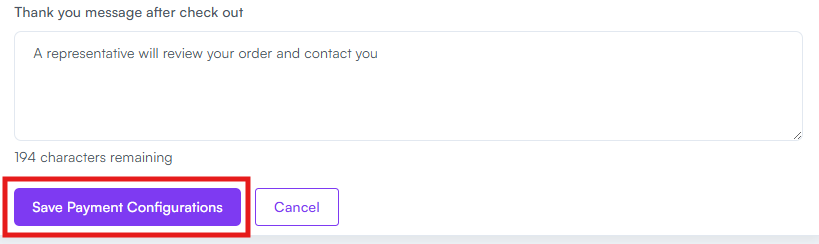
After saving, Square will be connected to your BRS website.
Recommended After Setup
After connecting Square:
- Place a small test booking
- Verify the card entry field appears correctly
- Confirm payments process successfully
- Test checkout on both desktop and mobile devices
Testing immediately helps catch SSL or setup problems before customers encounter them.
Common Issues
Card Entry Field Not Showing
This almost always means SSL is not active yet.
Confirm:
- Your domain is fully connected
- Your site loads with HTTPS
- SSL installation has completed
Without SSL, Square’s payment fields will not display.
Connection Not Completing
Make sure:
- You completed the full Square authorization flow
- You returned to BRS afterward
- You clicked Save Payment Configurations
Closing the browser early can interrupt the setup process.
Payments Not Processing
Check the following inside Square:
- Your Square account is fully verified
- Your account is active and unrestricted
- Payment processing is enabled
Account verification issues inside Square can block transactions.
Login or Authentication Problems
If Square login verification, 2-factor authentication, or account restrictions prevent access, contact Square Support directly.
BRS cannot bypass Square account security requirements.
Additional Recommendations
Square works especially well for businesses already using:
- Square terminals
- Square POS systems
- In-person payment processing
- Existing Square business infrastructure
If you're still deciding which processor to use see: How to Accept Card Payments on Your BRS Site (Choosing a Processor)