
How to Change the Payment Method on an Order
What This Is
BRS allows you to update the payment method associated with an order after it has been created.
This is useful when:
- A customer wants to pay using a different payment method
- A booking was created with the wrong payment type
- Payment arrangements change after the order is placed
- You need to convert a cash order to a card payment or vice versa
How to Change the Payment Method
-
Go to Orders → All Orders
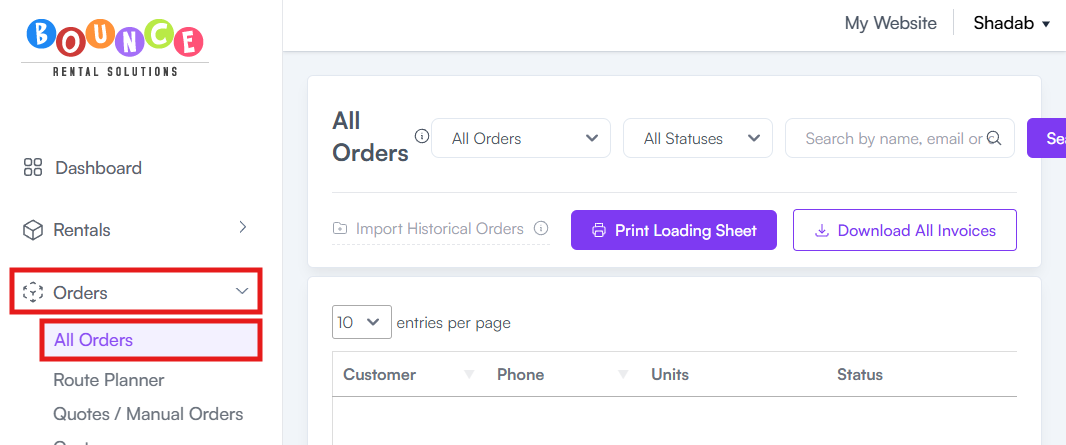
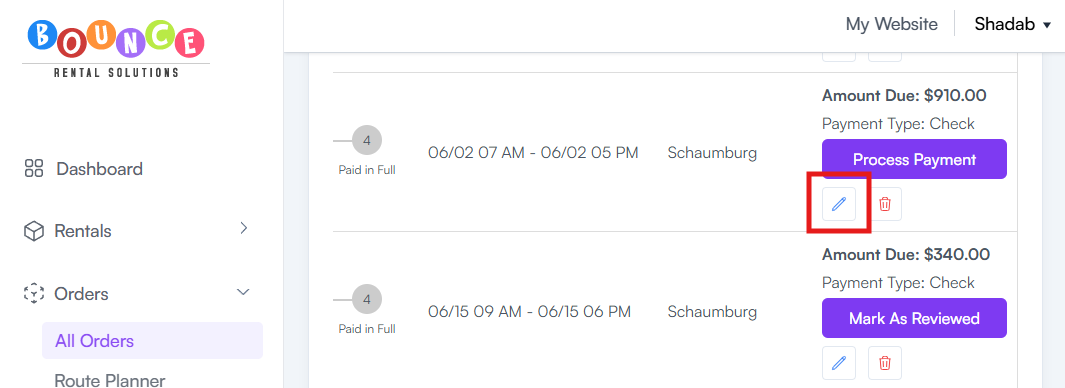
- Select the order you want to update
-
Click Edit Order
- Navigate to the Payment section
-
Click Change Payment Type
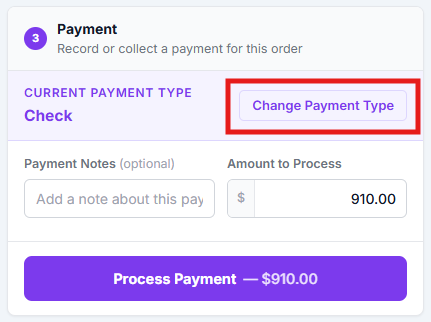
- Select the new payment method
-
Click Process Payment and Save
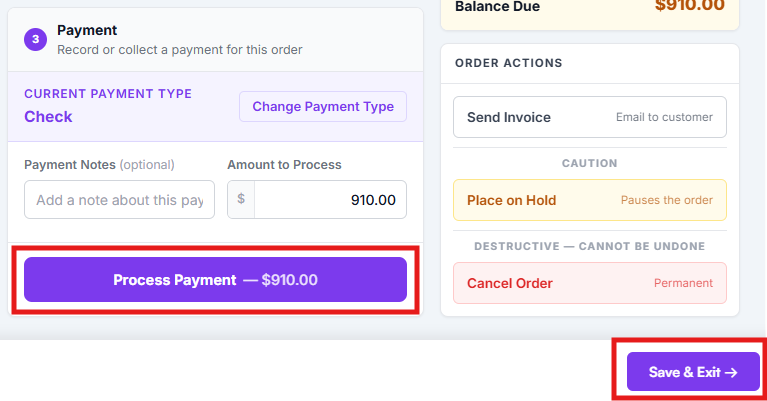
The order will now reflect the newly selected payment method.
Common Reasons for Changing Payment Methods
Customer Requests a Different Payment Method
Example:
A customer initially chooses Cash but later wants to pay by Credit Card.
Staff Entered the Wrong Payment Type
Example:
An order was accidentally created as Cash instead of Check or Card.
Payment Arrangements Change
Example:
A customer pays a deposit by card but wants the remaining balance collected by cash upon delivery.
Important Notes
Changing the payment method updates the payment type associated with the order, but it does not automatically process a payment.
If a payment still needs to be collected, you must complete the payment separately using your normal payment collection process.
Always verify:
- Outstanding balances
- Payment status
- Deposits already collected
- Remaining amounts due
before making payment-related changes.
Best Practices
Before changing an order's payment method:
- Confirm the customer's preferred payment option
- Verify any payments already collected
- Review outstanding balances
- Document special payment arrangements using order notes if necessary
(Info) See: How to Add Notes to an Order
Keeping payment information accurate helps reduce confusion for office staff, drivers, and customers throughout the rental process.
Additional Recommendations
If payment changes occur frequently, review your checkout process and staff procedures.
Repeated payment method corrections often indicate:
- Customer confusion during checkout
- Internal data entry mistakes
- Unclear payment instructions
Fixing the root cause is usually more effective than repeatedly correcting orders after they are created.