
When and How to Enable the Pickup Option
What This Is
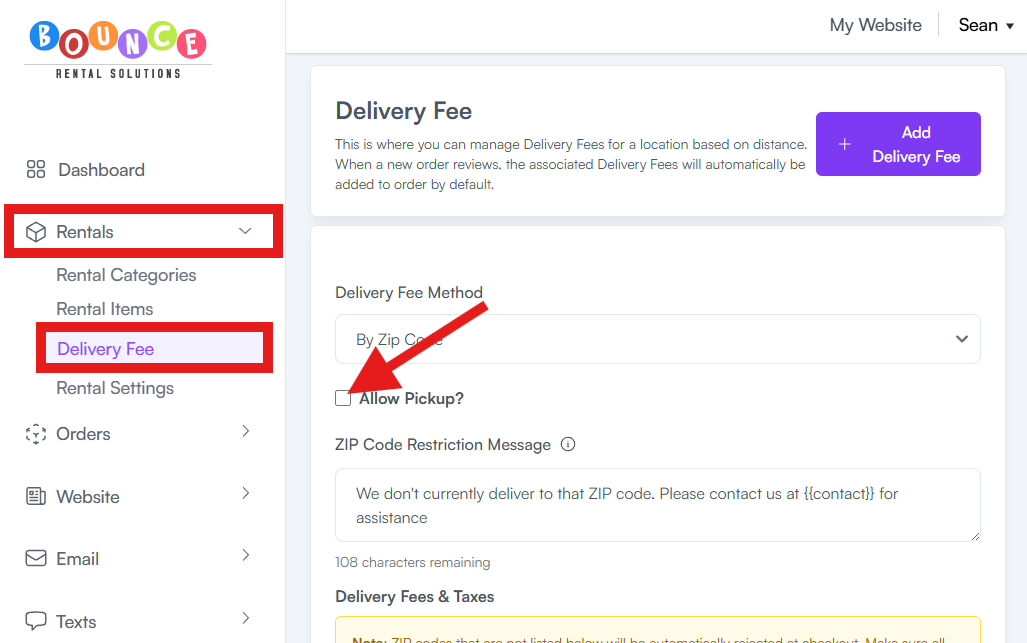
BRS allows you to give customers the option to pick up their rental instead of having it delivered. This setting should only be turned on if you actually offer this service.
Steps
1. Go to Rentals → Delivery Settings (or Rental Settings)
2. Find the Pickup Option toggle
3. Turn it ON only if you genuinely offer customer pickup
4. Save your settings
When to Use It
- Turn it ON only if customers can pick up orders from your location.
- Leave it OFF if all orders are delivered.
- If it is OFF, pickup will not appear at checkout.
Important:
Do not turn this on unless you actually offer pickup. Turning it on makes pickup available to customers during checkout.
If you only offer pickup occasionally or as an exception, do not turn this on. This setting makes pickup available to all customers during checkout.
If you charge for pickups, you can add a manual fee to orders (see: How to Set Up a Pickup Service Fee)