
Finding Your Google Place ID (Including Service-Area Businesses)
What This Is
Your Google Place ID is a unique identifier for your business on Google. You need it to display Google reviews on your BRS website. See How to Add Google Reviews to Your Website.
Standard Method — Use Google's Place ID Finder
-
Go to Google's Place ID Finder:
developers.google.com/maps/documentation/places/web-service/place-id
- Search for your business name (add your city if your business name is common — e.g. "Epic Bounce Orchard Lake")
- Click on your business on the map
- Your Place ID will appear below the map — it starts with ChIJ
-
Copy and paste it into BRS (Website → Website Content → Testimonials → Google Place ID field)
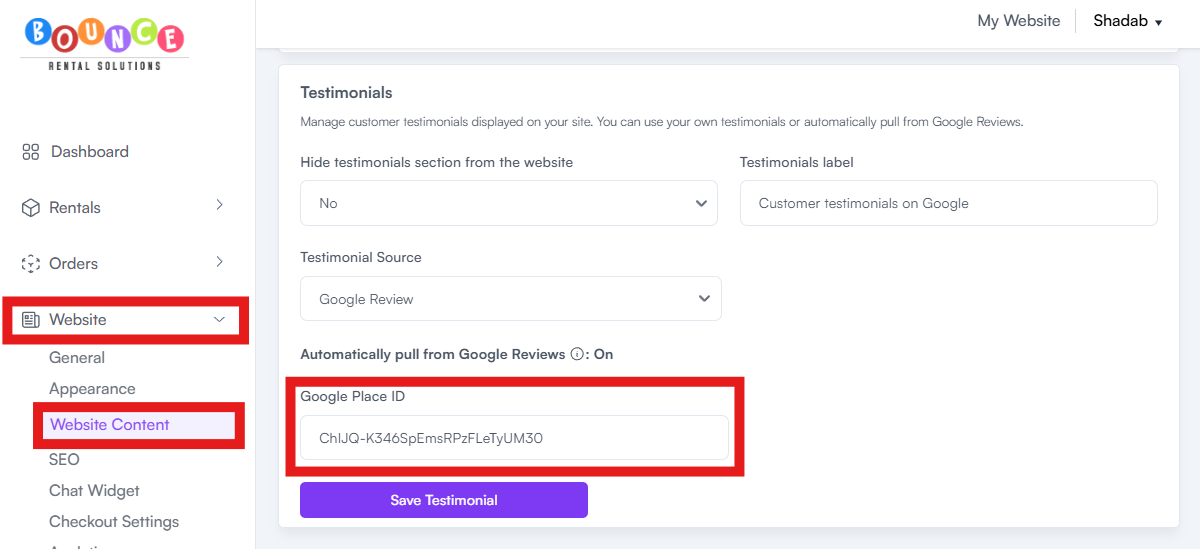
That's it for most operators.
If You Can't Find Your Business in the Place ID Finder
This usually happens with service-area businesses — businesses that do not have a public street address listed on Google.
Service-area business listings may not reliably return review data through Google's systems. The only reliable fix is to convert the listing from a service-area business to a storefront listing by adding a public business address.
Add a Public Business Address to Your Google Business Profile
If you have a real physical location such as a warehouse, office, or showroom, you can add it as your public business address. Once your listing is converted to a storefront listing and verified by Google, your business should become searchable in the standard Place ID Finder tool.
Heads up:
Once you convert your listing to a storefront, the address you add will display publicly on Google Search and Google Maps. If you operate from a home or a location you don't want public, consider whether this trade-off is acceptable before proceeding.
To do this:
- Sign in to your Google Business Profile
- Go to Edit profile → Business information → Location
- Add your real public business address
- Save your changes and wait for Google to complete verification
After verification is complete:
- Return to the Google Place ID Finder
- Search for your business and retrieve your Place ID
- Copy the Place ID
- Paste it into BRS
What NOT to Do
Do not list a fake address, a UPS Store address, or any address you don't legitimately operate from. This violates Google Business Profile policies and can result in your entire listing being suspended.