
How to Add a Favicon
What This Is
A favicon is the small icon that appears in the browser tab next to your website name. It makes your site look professional and helps customers identify your tab quickly when they have several open.
Steps
- Go to Website → Appearance
-
Find the Favicon upload field
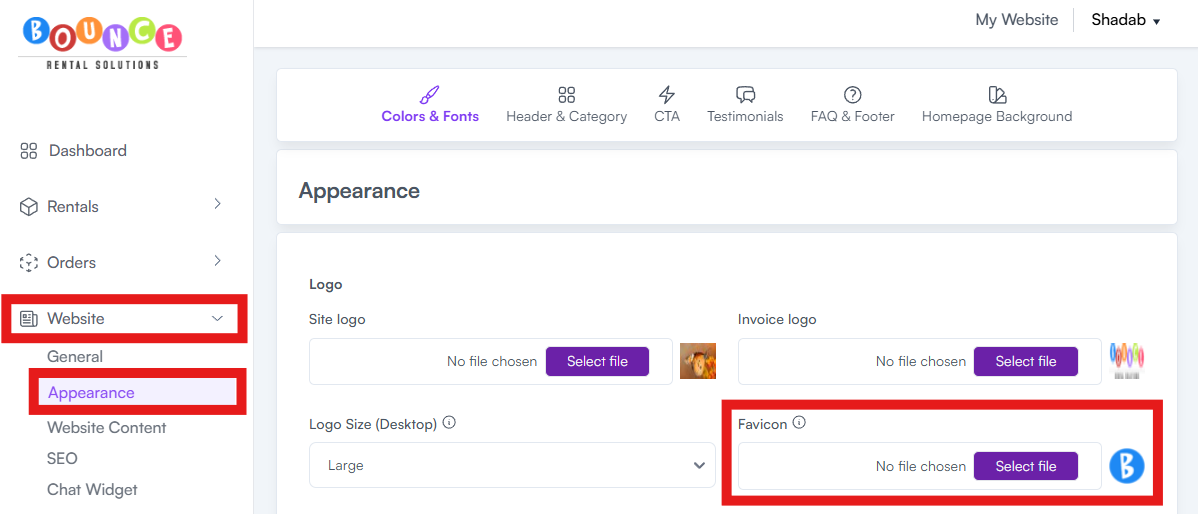
- Upload your favicon image — use .ico or .png format. A square image at 192×192 pixels or larger is recommended so it stays crisp on high-resolution screens (the browser will automatically size it down).
- Save/Submit your settings
Note on Where the Favicon Field Lives
The favicon upload is in Website → Appearance for both the Standard and New versions of the Appearance page. See How to Upload Your Logo and Set Brand Colors for the difference. On the New Version, you'll find it in the additional branding fields section near the bottom of the page.
Tip: Use your logo mark or your business's initials for the favicon. Keep it simple — anything too detailed becomes a blurry blob at favicon size. High contrast works best.