
Your BRS Account, Plan, and Billing
What This Is
This section covers your own BRS subscription — not the payments you collect from your customers.
From the Billing section, you can:
- Review your current subscription plan
- Update your payment method
- View past invoices
- Switch between Core, Growth, and Scale
- Toggle between monthly and yearly billing
Where to Find It
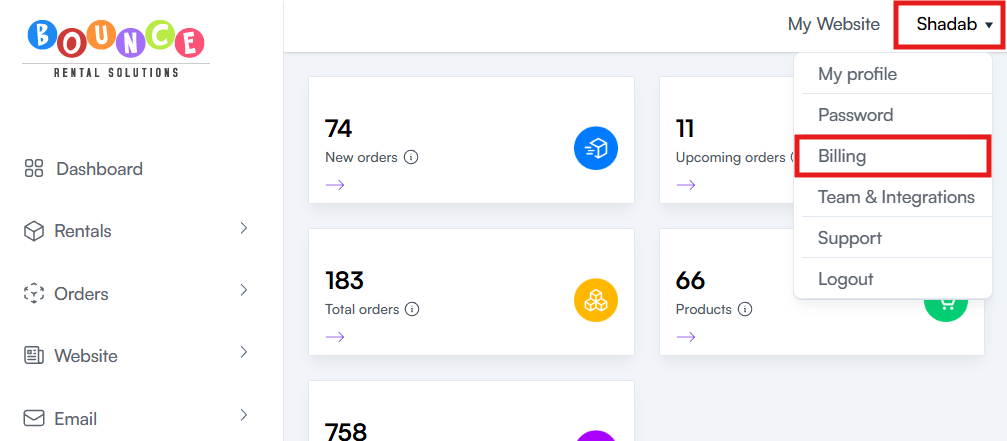
- Click your profile icon in the top-right corner of the dashboard.
- Select Billing from the dropdown menu.
What You Can Do Here
From the Billing page, you can:
- View your current plan
- Update the credit card on file
- View and download past BRS invoices
- Upgrade or change your subscription plan
- Switch between monthly and yearly billing
Understanding Monthly vs Yearly Billing
BRS offers both monthly and yearly subscription options.
The features available depend on your subscription plan. Choosing yearly billing changes how you are billed, but does not change the plan's included features.
BRS currently offers three subscription plans:
- Core
- Growth
- Scale
Monthly Plans
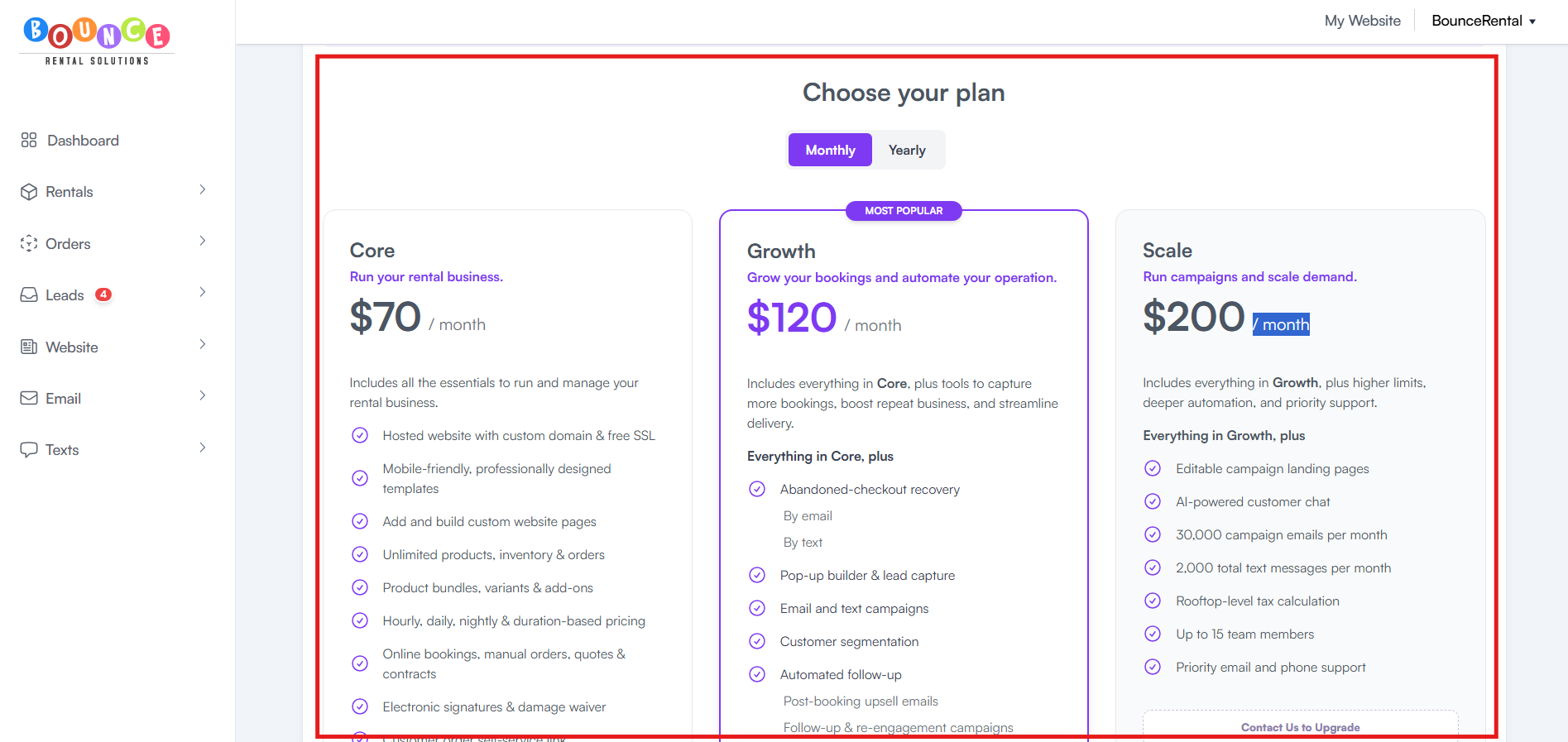
Core — $70/month
The Core plan includes the essential tools needed to run and manage your rental business.
Core features include:
- Online bookings
- Payment integrations
- Inventory management
- Reporting
- Website hosting
- SEO tools
Core is generally suited for businesses that need the essential tools to manage their rental operations online.
Growth — $120/month
The Growth plan includes everything in Core, plus additional tools designed to help automate communication, improve customer follow-up, organize deliveries, and capture more bookings.
Growth features include:
- Includes everything in Core, plus tools to capture more bookings, boost repeat business, and streamline delivery.
- Popup Builder
- Automated Campaigns
- Abandoned Cart Emails
- Referral Rewards
- Upsell Emails
- Newsletter Campaigns
- Text Messaging
- Chat Widget
- Google Maps Routing
Growth tools can help reduce manual work, improve customer communication, recover potential bookings, and streamline day-to-day operations.
Scale — $200/month
The Scale plan is designed for businesses that need additional capabilities beyond the Growth plan.
Scale plan pricing and included features:
- Includes everything in Growth, plus higher limits, deeper automation, and priority support.
- Editable campaign landing pages
- AI-powered customer chat
- 30,000 campaign emails per month
- 2,000 total text messages per month
- Rooftop-level tax calculation
- Up to 15 team members
- Priority email and phone support
Scale is launching this fall. Talk to us about early access.
Monthly billing is typically best for:
- Businesses wanting lower upfront costs
- Seasonal operators
- New businesses testing operations
- Companies wanting billing flexibility
Yearly Plans
Yearly billing allows you to pay for your selected subscription on an annual basis.
Core — $63/month or $756/year, billed annually
Includes the features available in the Core plan at the yearly billing rate.
Growth — $108/month or $1,296/year, billed annually
Includes all Growth plan features at a discounted yearly rate.
Scale — $180/month or $2,160/year, billed annually
Includes the features available in the Scale plan at the yearly billing rate.
Yearly billing is typically best for:
- Established businesses
- Long-term BRS users
- Businesses wanting lower total annual costs
- Companies preferring fewer billing transactions
How to Switch Between Monthly and Yearly
-
Go to the Billing page
-
Locate the Core, Growth, and Scale comparison table
-
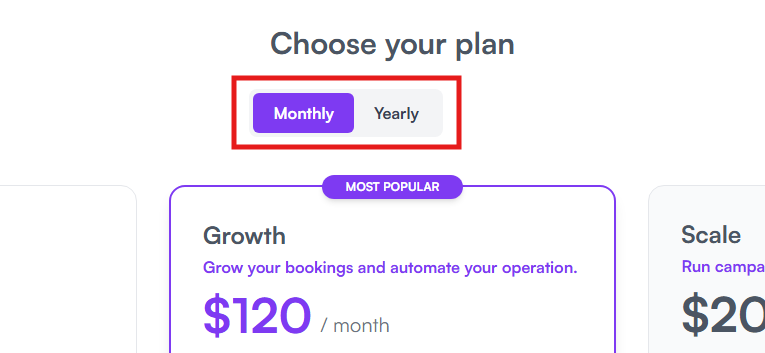
Toggle between Monthly and Yearly at the top of the pricing section
- Select your preferred plan
-
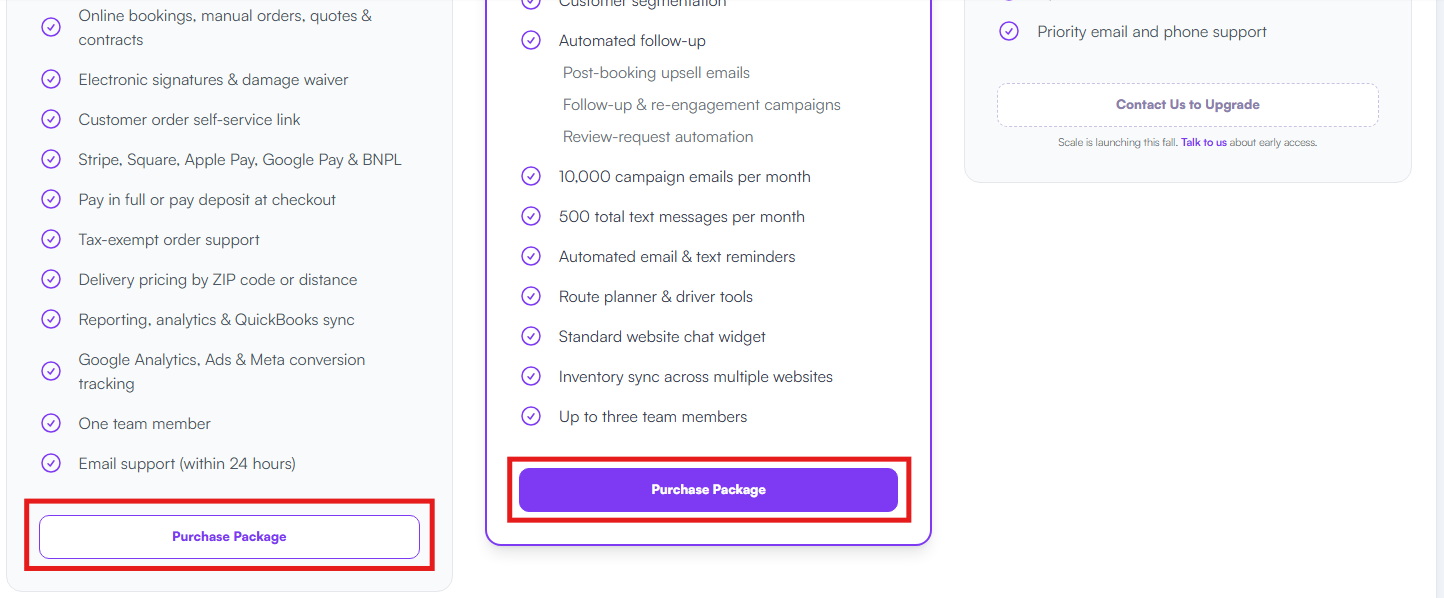
Click Purchase Package or Switch Plan
- Your billing cycle will update once the change is confirmed
Switching Between Subscription Plans
BRS offers three subscription tiers:
- Core
- Growth
- Scale
You can change your subscription directly from the Billing page without contacting support.
Upgrading
When upgrading to a higher plan:
- The plan change takes effect according to the billing information shown during checkout.
- Features included with the new plan become available once the upgrade is active.
Downgrading
When switching to a lower plan:
Features that are exclusive to the higher plan will no longer be available once the downgrade takes effect.
Review your current workflows before confirming the change.
Important Operational Notice
If your business relies on features included only in Growth or Scale, changing to a lower plan can remove access to those features.
For example, Growth includes tools such as:
- Abandoned-checkout recovery
- Text and email campaigns
- Post-booking upsells
- Route planner & driver tools
- Inventory sync
- Additional team members
Scale includes additional features such as:
- AI-powered customer chat
- Higher campaign limits
- Advanced campaign landing pages
- Priority support
- Additional team members
Make sure your team is prepared for any feature changes before switching plans.
Important Notes About Billing
Billing vs. Customer Payments
Your Billing page only controls your BRS subscription.
Payments collected from your customers through Stripe, Square, or other payment processors are managed separately through your connected payment processor accounts.
See:
Choosing the Right Plan
Core
Core is designed for businesses that primarily need the essential tools to operate their rental business, including bookings, inventory, payments, reporting, website hosting, and basic analytics and tracking.
Growth
Growth is designed for businesses that want to increase bookings and automate more of their operation. The additional marketing, customer follow-up, abandoned-checkout recovery, messaging, upselling, and delivery tools can reduce manual work and help recover more potential bookings.
Scale
Scale is designed for businesses looking to run larger campaigns and scale demand, with higher communication limits, deeper automation, additional team capacity, advanced chat, and priority support.
The best plan is the one that matches the tools your business actually needs. You do not need to choose a higher plan simply because it has more features.