
How to Charge an Extra Deposit on High-Value Items
What This Is
BRS deposits are system-wide, meaning there is only one global deposit setting that applies across all orders.
You set this once in:
Checkout Settings → Deposit Settings
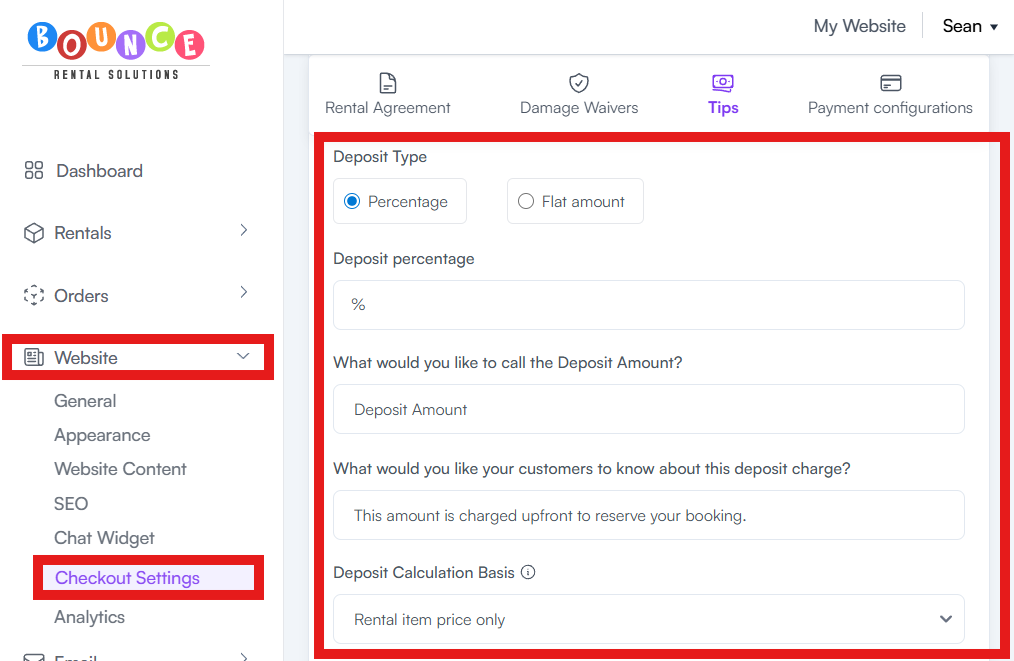
That deposit is:
- A single percentage or fixed amount
- Automatically applied to every order
- Not customizable per product
This is a deliberate design choice. There is no per-item deposit field in BRS.
If you’re trying to charge a higher deposit for high-value items, you cannot do it directly inside product settings.
You have to use a workaround.
How Deposits Actually Work
Example:
If your global deposit is 20%:
- A $100 item → $20 deposit
- A $1,000 item → $200 deposit
Same rule applies everywhere.
This creates a problem when:
- Some items are low-risk
- Others are high-value or high-damage risk
So you need a strategy to handle exceptions.
Workaround 1: Add a Separate Security Deposit Line Item
This is the most practical solution.
Instead of trying to modify the system deposit, you manually add an extra charge item to the order.
Steps:
-
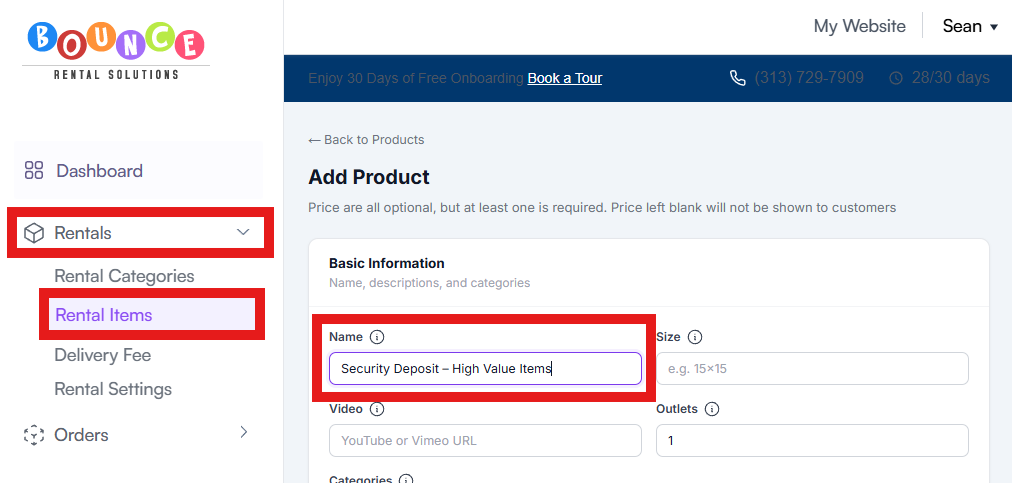
Create a product called “Security Deposit – High Value Items”
-
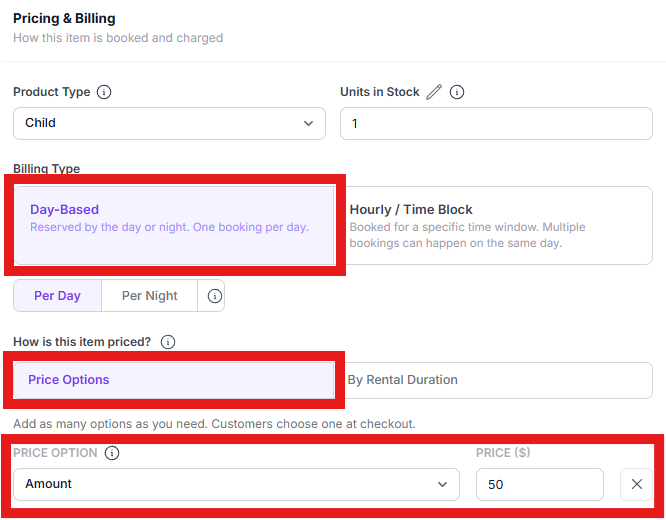
Set a fixed price (example: $50, $100, etc.)
- Add it manually to applicable orders at checkout or in the order editor
- Refund it after the event if no damage occurs
When to use this:
- Expensive inflatables
- Electronics
- Specialty equipment
- High-risk rentals
Pros:
- Fully flexible
- Works per order
- Easy to adjust amounts
Cons:
- Requires manual control
Workaround 2: Handle It Through Contract Terms
Instead of changing pricing inside the system, you enforce liability through your rental agreement.
You specify:
- Customers are responsible for damages beyond the deposit
- Additional charges may apply after inspection
- Deposit does not cap liability
This approach is used when:
- You don’t want extra checkout complexity
- You prefer legal protection over upfront pricing changes
Pros:
- No system changes needed
- Scales automatically
- Clean checkout experience
Cons:
- Requires strong contract enforcement
- May be harder to communicate to customers
Important Limitation
BRS does NOT support:
- Per-product deposit percentages
- Item-specific deposit rules
- Dynamic deposit calculations per rental item
All deposit logic is global.
Setting Up Your Deposit
If you need custom deposit behavior per product, you must use one of the workarounds above.
Choosing the Right Approach
Use the line-item deposit if:
- You want upfront control
- You have clear high-risk items
- You want deposits to feel transparent at checkout
Use contract coverage if:
- You want a simple checkout experience
- You handle damage cases manually anyway
- You rely on post-event inspection workflows
Many operators use both:
- Small global deposit (system)
- Extra manual deposit for high-value items
- Contract language for full liability coverage
Related Articles