
How to Enable Buy Now, Pay Later at Checkout
What This Is
Buy Now, Pay Later (BNPL) allows eligible customers to split their purchase into multiple payments instead of paying the full amount upfront.
BRS supports Buy Now, Pay Later options through Stripe and Square.
Available providers include:
- Affirm
- Afterpay
- Klarna
When enabled, these payment methods can appear during checkout for customers who qualify based on factors such as:
- Location
- Order total
- Eligibility requirements set by the payment provider
All approval decisions are handled directly by the financing provider, not by BRS.
Important
Buy Now, Pay Later is only available if you process payments through Stripe or Square.
You must have an active Stripe or Square account connected to BRS before Buy Now, Pay Later options can be offered at checkout.
Before You Start: BNPL Requires Two Steps
Buy Now, Pay Later is always a two-step setup process.
Step 1: Enable BNPL in Stripe or Square
You must first enable your preferred Buy Now, Pay Later provider inside your payment processor account.
If this step is not completed, no Buy Now, Pay Later options will appear at checkout, even if BNPL is enabled inside BRS.
Step 2: Enable BNPL in BRS
After enabling the provider inside Stripe or Square, you must then enable Buy Now, Pay Later inside BRS.
Both steps are required.
If Step 1 is skipped, nothing will appear at checkout.
Step 1: Enable BNPL Providers in Stripe
Stripe supports the following Buy Now, Pay Later providers:
- Affirm
- Afterpay
- Klarna
To enable them:
- Log in to your Stripe account
- Go to Settings
- Select Payment Methods
- Enable one or more of the following:
- Affirm
- Afterpay
- Klarna
- Save your changes
Once enabled in Stripe, BRS can display those payment options during checkout.
Step 1 (Square Users): Enable Afterpay in Square
Square currently supports Afterpay as its Buy Now, Pay Later option.
To enable Afterpay in Square:
- Log in to your Square Dashboard
- Go to Settings
- Select Account & Settings
- Click Payments
- Select Payment Methods
- Locate Afterpay
- Click the ••• menu
- Select Edit Settings
- Toggle Online to ON
- Click Save
Once enabled in Square, continue to Step 2 below.
Step 2: Enable Buy Now, Pay Later in BRS
-
Go to Website → Checkout Settings → Payment Configurations
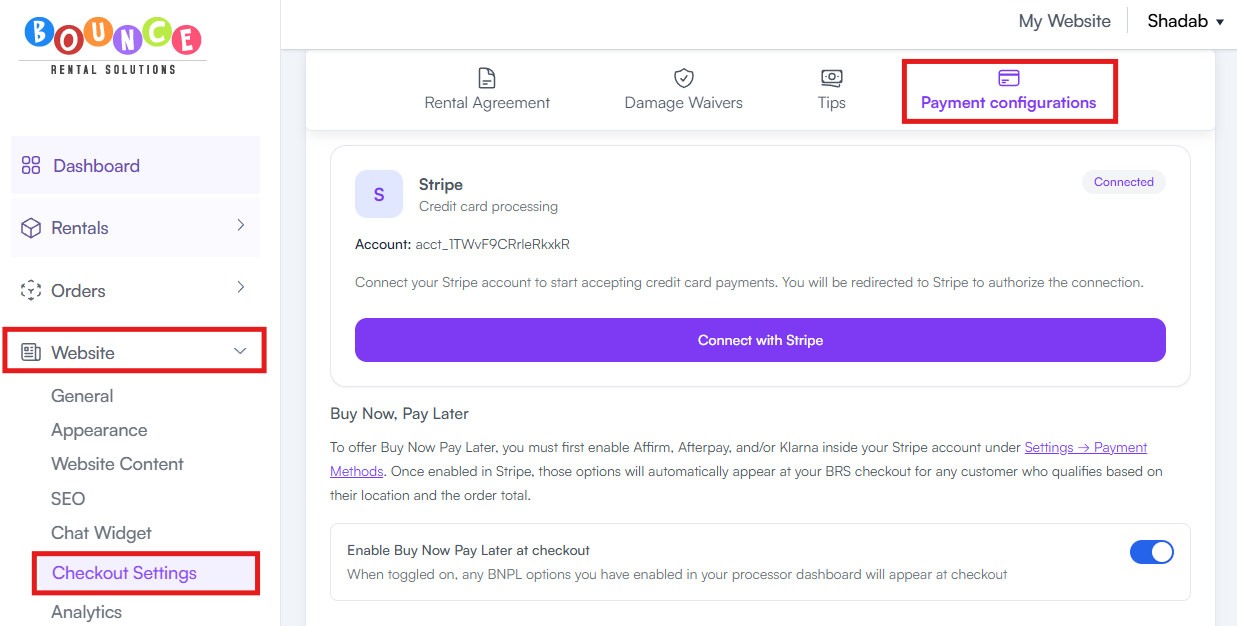
- Scroll down to Buy Now, Pay Later
-
Toggle on Enable Buy Now Pay Later at Checkout
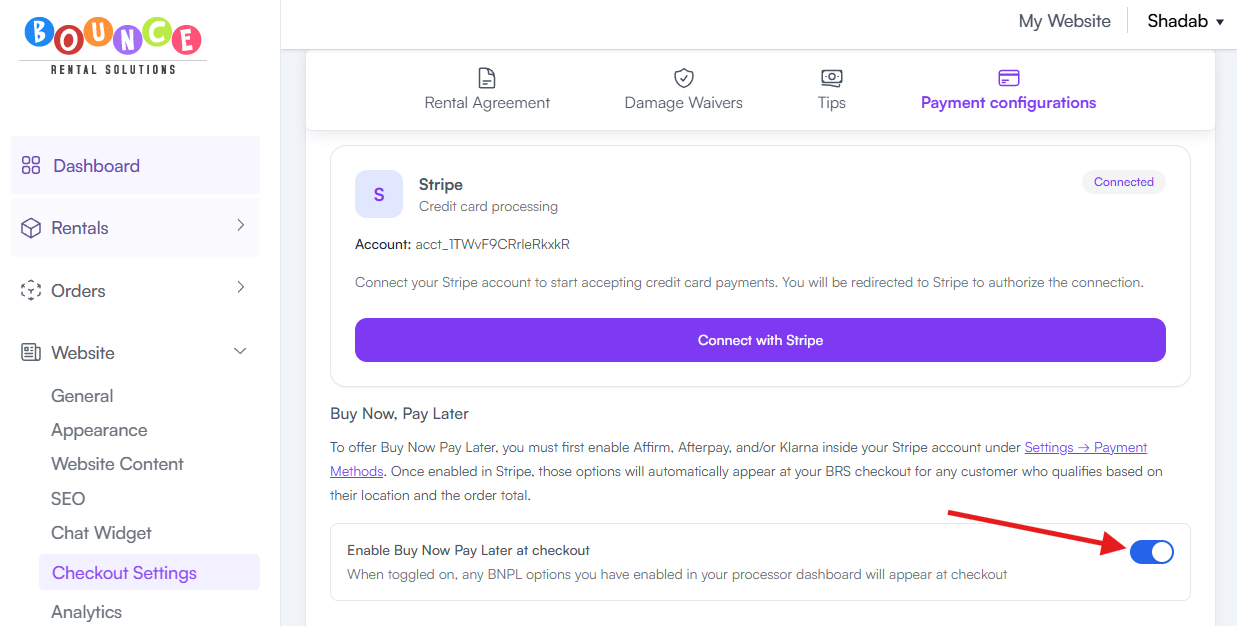
- Scroll all the way down and Save your changes
Once enabled, eligible customers may see available Buy Now, Pay Later options during checkout.
Important: Enabling BNPL in BRS alone is not enough. The provider must first be enabled in Stripe or Square.
What the Customer Experiences at Checkout
When a customer reaches checkout:
- They will see their standard payment options along with any Buy Now, Pay Later options you have enabled.
- The customer selects their preferred Buy Now, Pay Later provider.
- They are redirected into that provider's application and approval flow.
- The provider instantly reviews the application and determines eligibility.
- If approved, the provider presents available payment plan options.
- The customer selects their preferred payment plan and completes the process.
- The customer is automatically returned to your BRS confirmation page just like a normal booking.
The financing provider manages:
- Approval decisions
- Payment schedules
- Installment collection
- Financing terms
The rental company receives the full payment upfront regardless of which installment plan the customer selects.
What Customers Will See at Checkout

Depending on which providers are enabled in your Stripe or Square account, eligible customers may see:
Affirm
Available in the United States and Canada.
Features:
- Order totals typically between $50 and $30,000
- Installment payment options
- No compounding interest
Afterpay
Available in:
- United States
- Canada
- United Kingdom
- Australia
Features:
- Pay in 4 installments
- Interest-free payments over approximately 6 weeks
Klarna
Available in the United States and more than 25 additional countries.
Features:
- Pay in 4
- Pay Later
- Monthly financing options
The payment methods shown at checkout depend on:
- Which providers are enabled in Stripe or Square
- Customer location
- Order total
- Provider eligibility requirements
Recommendation: Choose One Buy Now, Pay Later Provider
While Stripe allows multiple Buy Now, Pay Later providers to be enabled at the same time, we typically recommend enabling only one.
Showing too many financing options can:
- Create decision fatigue
- Make checkout feel cluttered
- Increase customer confusion
For most event rental businesses in the United States, Afterpay is often the most recognized Buy Now, Pay Later option.
Choose the provider that best fits your customer base and keep the checkout experience as simple as possible.
Why Offer Buy Now, Pay Later?
Many businesses enable BNPL because it can:
- Increase booking conversions
- Make larger orders more affordable
- Reduce upfront payment concerns
- Improve customer flexibility
- Encourage higher average order values
Customers often appreciate having additional payment options during checkout.
Important Notes
Approval Is Controlled by the Provider
BRS does not approve or deny applications.
All approval decisions are made directly by:
- Affirm
- Afterpay
- Klarna
Stripe or Square Must Be Connected
Buy Now, Pay Later requires an active Stripe or Square payment processor connection.
See:
Full Payment Is Required
When a customer selects a Buy Now, Pay Later payment method, the standard deposit workflow is automatically bypassed.
The customer must finance the full order amount through the Buy Now, Pay Later provider.
This means:
- You receive the full payment upfront
- The financing provider handles installment collection directly with the customer
- Your normal deposit settings do not apply to that transaction
This helps reduce payment collection risk while still giving customers flexible payment options.
Common Questions
Can I Choose Which Providers to Offer?
Yes.
You can enable or disable individual providers directly within your Stripe or Square payment settings.
Additional Recommendations
After enabling Buy Now, Pay Later, place a test booking and review your checkout experience.
Offering flexible financing options can help reduce checkout friction and make larger rental reservations more accessible to customers.