
How to Hide the Testimonials Section on Your Website
What This Is
The testimonials section displays your customer reviews on your website (typically pulled from Google reviews — see How to Add Google Reviews to Your Website). If you don't have enough reviews yet, or you'd rather not show this section right now, you can hide it with a single toggle.
Steps
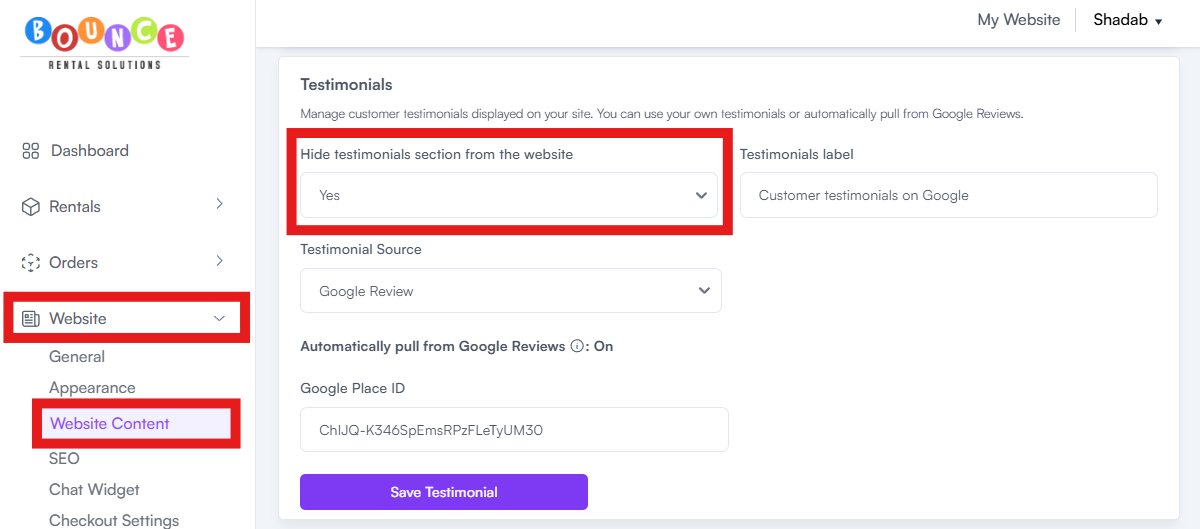
- Go to Website → Website Content
- Find the Testimonials section toggle
-
You'll see "Hide testimonials section from the website" — toggle to Yes to hide
- Preview with My Website to confirm it's hidden
When to Hide Testimonials
- You have fewer than 5 strong reviews — an empty or thin testimonials section hurts trust more than no section at all
- You're a brand-new business still building your review base
- You're a service-area business whose Google reviews aren't pulling correctly yet (see How to Add Google Reviews to Your Website)
- You're temporarily redesigning your site and want this section off until reviews are ready
Tip: Hide the section until you have at least 5 reviews with an average rating of 4.5 stars or higher. Until then, customers' trust is better served by your FAQs and your delivery area / pricing transparency. See How to Add FAQs to Your Website.